MCP Apps: When the AI Chat Ships Its Own UI
On a genAI chat, it is sometimes capable of generating small, dynamic user interfaces. For example, on a complicated finance subject you might get dynamic pie charts or line graphics as part of the answer.
It is a very sweet feature, and I got curious about how it is implemented. At the beginning I thought the genAI itself was generating these small UIs. In reality, behind these interfaces there are MCP servers and to be more precise, in most cases the generated interface is an MCP App.
To experiment with this, I created a live Proof of Concept (PoC) which you can try at genui.iheb.pro.
MCP Apps, in short
MCP Apps are tightly related to the classical MCP protocol, which communicates over stdio (local servers) and Streamable HTTP (remote servers the older HTTP+SSE transport is now deprecated). The difference is that these MCP servers are capable of shipping frontends as well. Using their tools, the AI agent gets results back, and those results land in a beautiful chart or another figure depending on the nature of the returned data. The concept has now expanded to shipping dynamic JavaScript and CSS, which makes it possible to have entire small applications inside the chat response hence the name MCP App.
A tiny taste of how a server declares one:
Server Declaration
These interfaces work in a very efficient flow. As soon as you enter a prompt that needs the MCP App, the host preloads the UI from a resource like ui://weather/dashboard without data at first and packages it in a sandboxed iframe. The agent then calls the server tools to fulfill the request, the MCP server responds, and the information is loaded into the application. The user can also interact with the application, and in consequence the application itself can send messages back to the AI agent, which can call the MCP tools again to fulfill the new request and refresh the information shown.
You can find more information about MCP Apps in this documentation it even has a cool assistant chat to explore the docs.
I saw various examples and use cases. There is an Excalidraw MCP App where you can create editable charts via AI prompts, or even ask it to explain a complicated concept as an Excalidraw diagram. There is today a large list of MCP Apps available, and you can find an even better definition on pulseMCP.
Building a PoC and the BYOK question
I wanted to PoC this MCP App generation: an MCP server plus a chat that renders these UIs, using SSR technologies like Next.js. Vercel ships an AI SDK as well to handle such implementations. But in order to demo this, I would need to expose a model with the agent... or do I?
BYOK (Bring Your Own Key) is available on web applications as well. In this model, the user brings the API key of his chosen AI to operate the application. This model exists for several reasons:
- Pricing: you pay for your exact usage, instead of the app holding a subscription to sustain model costs for everyone.
- Customizable usage: you can choose any of your models.
- Privacy: requests go to the model provider through your own credentials.
The BYOK model has been gaining popularity thanks to these benefits. Since almost all modern services are shipping AI features, it makes sense that users start using their own keys, and that the pricing becomes smaller and focused on the service itself.
I decided to use this model for a PoC chatbot that can ship MCP Apps.
Providing API credentials is very sensitive, and the API key is entered in the browser. In the PoC it is stored in sessionStorage only if you opt in, requests go to the AI provider through a thin pass-through API route, and the key is never stored anywhere else, never logged, and stays in the tab scope:
Key Lifecycle
Storage
Important: If you want to try the PoC at genui.iheb.pro, please note that an MCP server connection is mandatory. Since the PoC relies on free server tiers, the initial connection might take up to 30 to 40 seconds to spin up. If the chat hangs, or if you receive a response in the chat stating that the server is unreachable, simply refresh the connection (disconnect and reconnect) to wake it up.
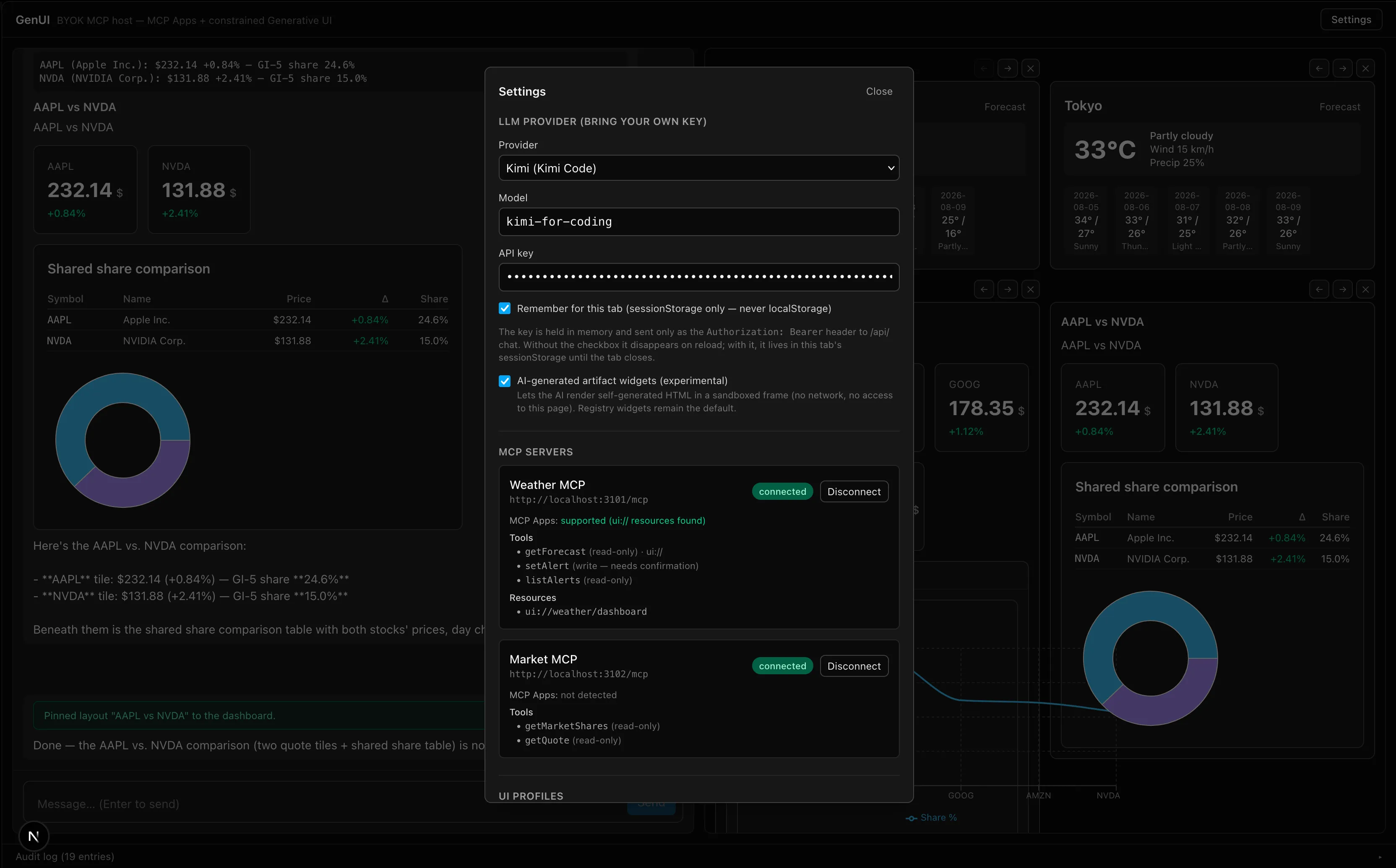
Two kinds of widgets
I vibecoded the application. It can display and pin two types of widgets:
- Weather widget: based on the MCP Apps spec a server offering tools and exposing a UI resource on
ui://weather/dashboard. - Market share widget: a simple MCP server serving plain JSON results, where the connected model generates small UIs for it using Zod-validated component schemas deviating from the MCP Apps spec, but offering more customization on the UI.
Widget Rendering
In fact, with MCP Apps the user interfaces are not generated by the agent they are pre-developed and tested, as explained in the official spec. For simple servers not shipping a UI, we can still deliver React widgets that are customizable on their UI side; MCP Apps, on the other hand, are customizable on their data side. The choice is obviously better for MCP Apps at the moment:
- to scope the UI, and to validate and test the application;
- to be secure against injection and violations.
What I learned, and where this might go
On the PoC I was able to generate weather widgets using the MCP data and successfully update their content, and I can choose to pin the ones that succeeded. On the market share side I had more control over the display and more bugs as well, which justifies again the current model of MCP Apps.
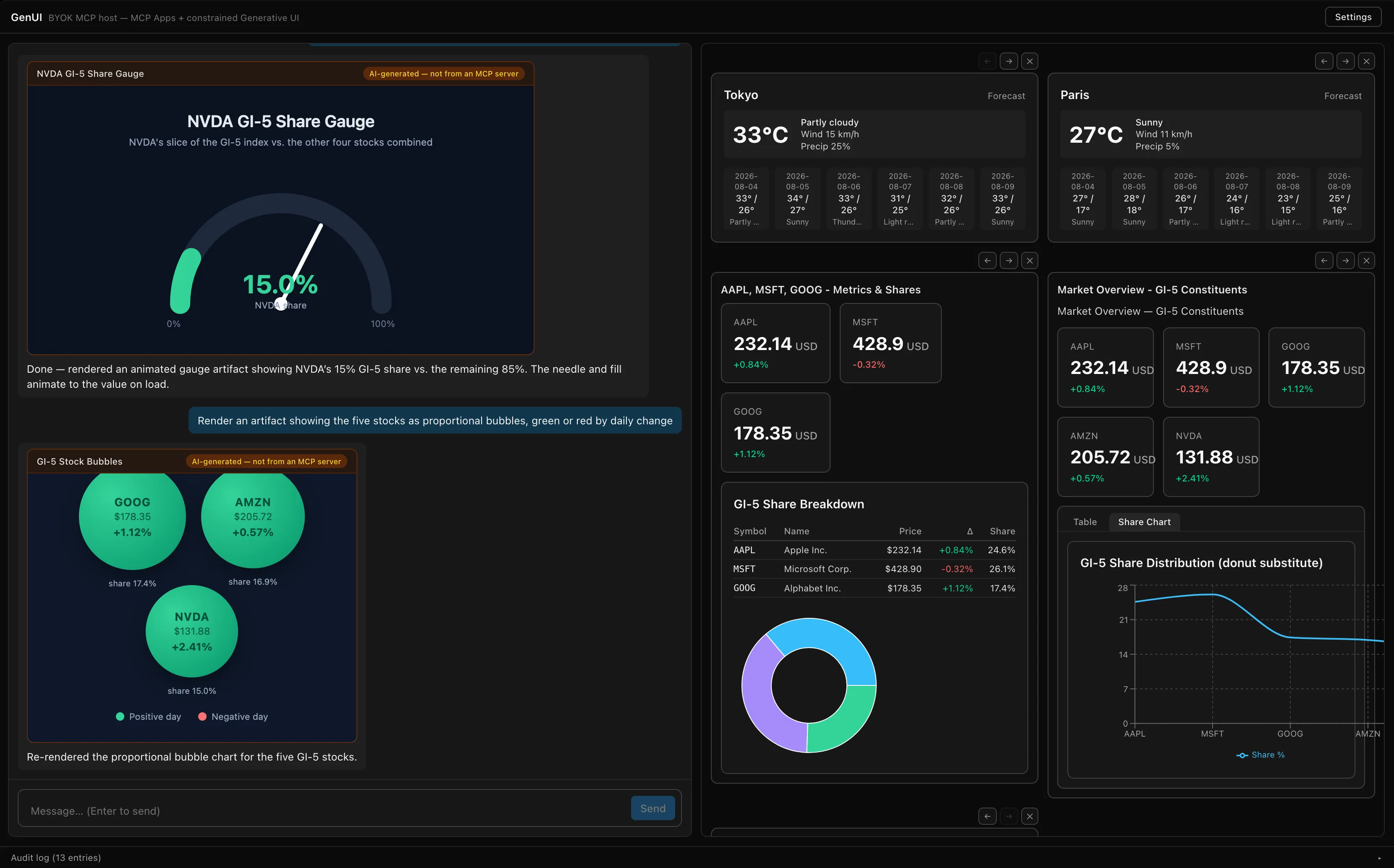
The MCP model reminds me of the SOAP service concept from the early days: a market of documented, usage-oriented services that JEE with preset front apps would consume. With the UI-shipping evolution, the use cases are wide but will require a large development effort. Today it is still very complicated for the AI to deduce from the tools even though they are documented and executable which UI to generate, let alone generate it correctly functional from the first take. So the interesting question is: is there a compromise in the middle between these two solutions, evolving the concept of MCP Apps?
I believe that in the near term, the ready-made UI layer will be slowly complemented by instructions and light AI UI frameworks that compose the interface to the taste of the user, giving more control while the sandboxed, pre-developed MCP App remains the safe default. MCP Apps offer limitless possibilities to editors; if they become democratized on agentic chats, we may need the classic internet browser a lot less.