SageMaker Unified Studio Projects
SageMaker Unified Studio (SMUS) revolutionizes how we manage data and AI infrastructure by abstracting environments into cohesive Project Profiles. This article explores the architectural shift from DataZone v1 and provides a comprehensive guide to the SMUS project lifecycle, from configuration to deployment.
1. Architectural Differences: DataZone v1 vs. SageMaker Unified Studio (SMUS)
To understand the architectural evolution of SageMaker Unified Studio (SMUS), we must look at how its foundational data governance layer—Amazon DataZone—originally structured its environments and project limits.
Amazon DataZone (v1) Environment Architecture
In DataZone v1, every project offered default foundational capabilities (such as Lakehouse databases, Amazon Redshift, or AI assets) and was tightly coupled with one or more environments.
- The Environment Layer: An environment represents a target AWS workspace defined by a specific AWS account and region. Deploying an environment automatically provisions required resources. For instance, a standard Lakehouse database blueprint provisions both a publication database and a subscription database, while automating permissions and resource sharing within that workspace.
- Workspace Flexibility: A single DataZone project can host multiple environments distributed across separate AWS accounts. While cross-region support was recently introduced, the execution region was historically constrained by the region of the primary DataZone domain.
- Configuration Mechanism: This architecture relies on an Environment Profile to manage target workspace configurations and subscription grants. Consequently, a project often contains multiple distinct environment profiles to handle its various deployments.
The SMUS Evolution
SageMaker Unified Studio fundamentally shifts this paradigm by abstracting the infrastructure layer one step further, replacing individual environment profiles with a unified concept called a Project Profile.
| Architectural Dimension | Amazon DataZone (v1) | SageMaker Unified Studio (v2) |
|---|---|---|
| Profile Mapping | Multiplicity of Environment Profiles per project. | One, and only one, Project Profile per project. |
| Environment Boundaries | Tied to a single workspace/account configuration. | Represents deployed capabilities across multiple workspaces. |
| Capability Aggregation | Hardcoded or constrained by the selected environment blueprint. | Spans multiple distinct AWS accounts and regions inside a single profile. |
2. Concept Description: Projects and Project Profiles
A Project Profile serves as a centralized blueprint for defining the workspaces, governance boundaries, and architectural capabilities that a team can provision. Instead of configuring separate environment profiles across multiple accounts, administrators use the Project Profile to establish global parameters in a single configuration plane.
Decoupling Configurations and Delayed Parameters
Project Profiles allow administrators to define default architectures while leaving specific environmental parameters variable. High-level workspace configurations, target regions, and specific resource boundaries can be delayed to the point of project creation. This approach creates highly reusable, generic profiles that adapt dynamically to different delivery use cases based on user inputs.
Security and Governance Controls
To enforce compliance and infrastructure guardrails, the Project Profile acts as a strict governance layer. Administrators can mark sensitive configuration parameters as non-editable. This locks down controlled variables (such as specific security groups, KMS keys, or IAM boundaries) while leaving operational parameters open for developer input during provisioning or project updates.
In SMUS, the definition of a Project changes significantly: it is no longer a single environment definition cloned across multiple accounts. Instead, a SMUS project represents an aggregated ecosystem of defined capabilities, configurations, and tools that span across multiple AWS workspaces but are deployed and managed as a single cohesive unit.
3. Deep Dive: Project Lifecycle and Provisioning Mechanics
Understanding how these abstraction layers interact requires a deep dive into the practical CRUD (Create, Read, Update, Delete) lifecycle of a SMUS project. Infrastructure flexibility is achieved by stacking CloudFormation blueprints beneath the Project Profile layer.
Phase 1: Project Profile Configuration
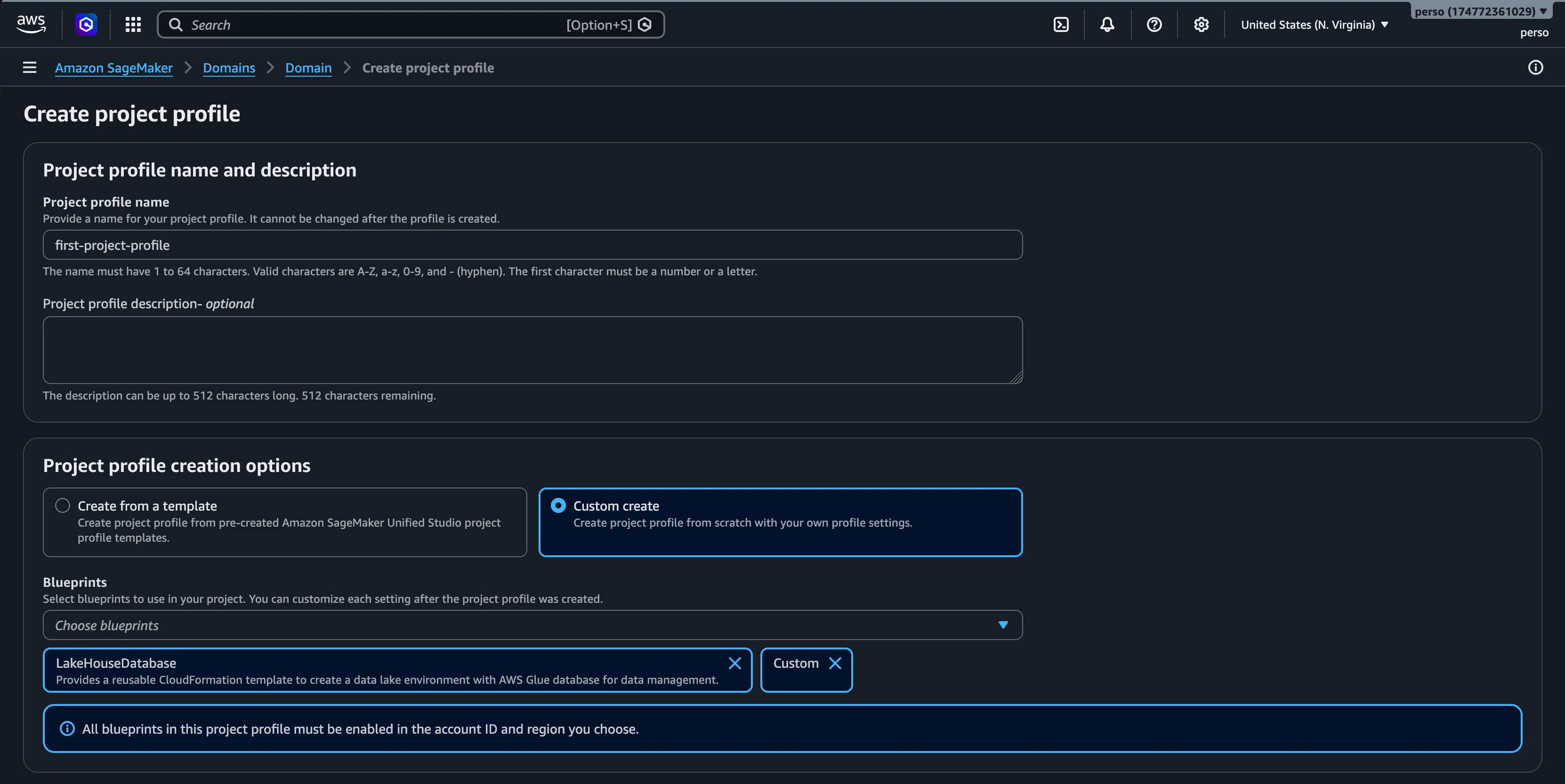
Before a user can deploy a project, an administrator must create and enable a Project Profile. This profile maps out exactly which underlying CloudFormation (CFN) blueprints are available.
For this walkthrough, we will look at a standard use case featuring an AWS-managed datalake database blueprint combined with a custom demo blueprint.
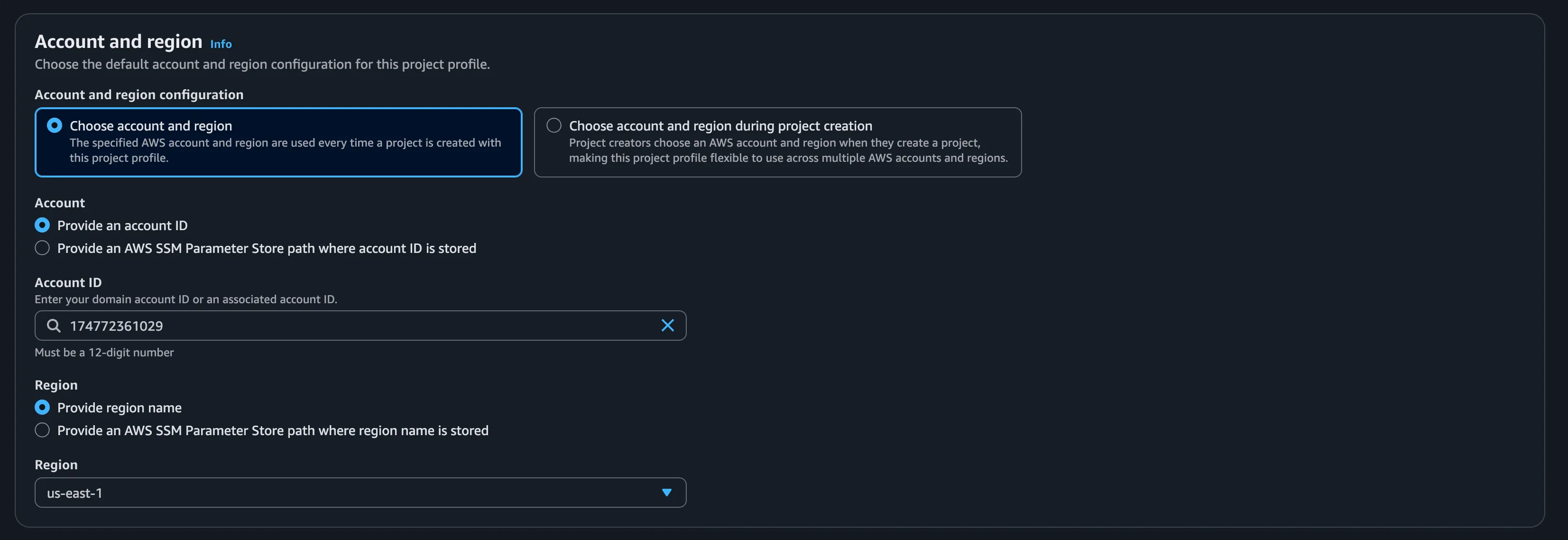
When configuring the target accounts and regions within the profile, the interface filters the available account list to display only the external domains explicitly associated with the root domain. Cross-account deployments require this domain association as a strict prerequisite.
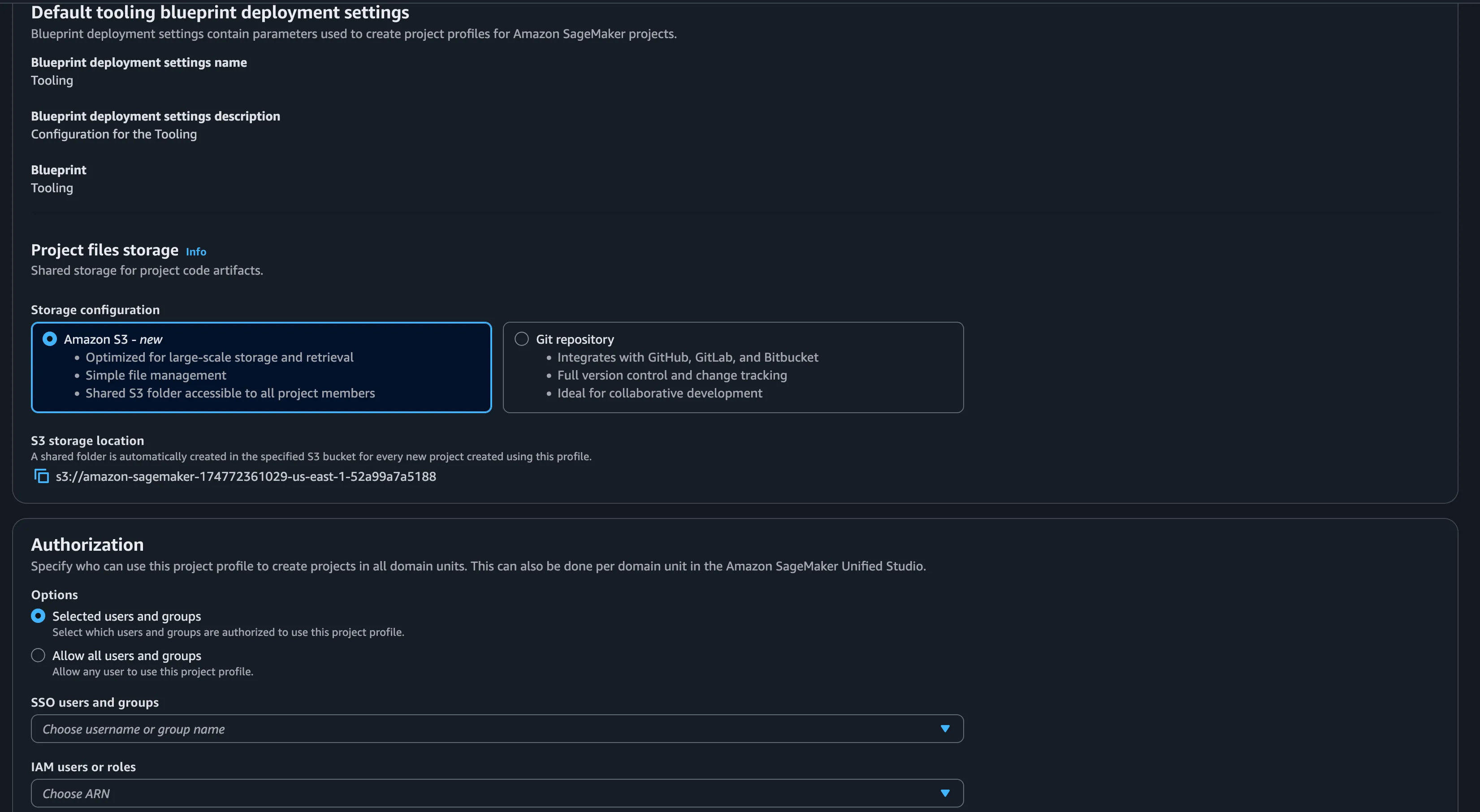
The profile also dictates underlying storage configurations (such as dedicated Amazon S3 buckets) and user authorization boundaries, applying a localized governance layer directly to the profile itself.
Once configured, the profile’s initial enablement status can be set directly from the creation wizard.

After successful validation, the active Project Profile explicitly displays its associated regions, along with the assigned blueprints and their corresponding parameters for each target deployment zone.
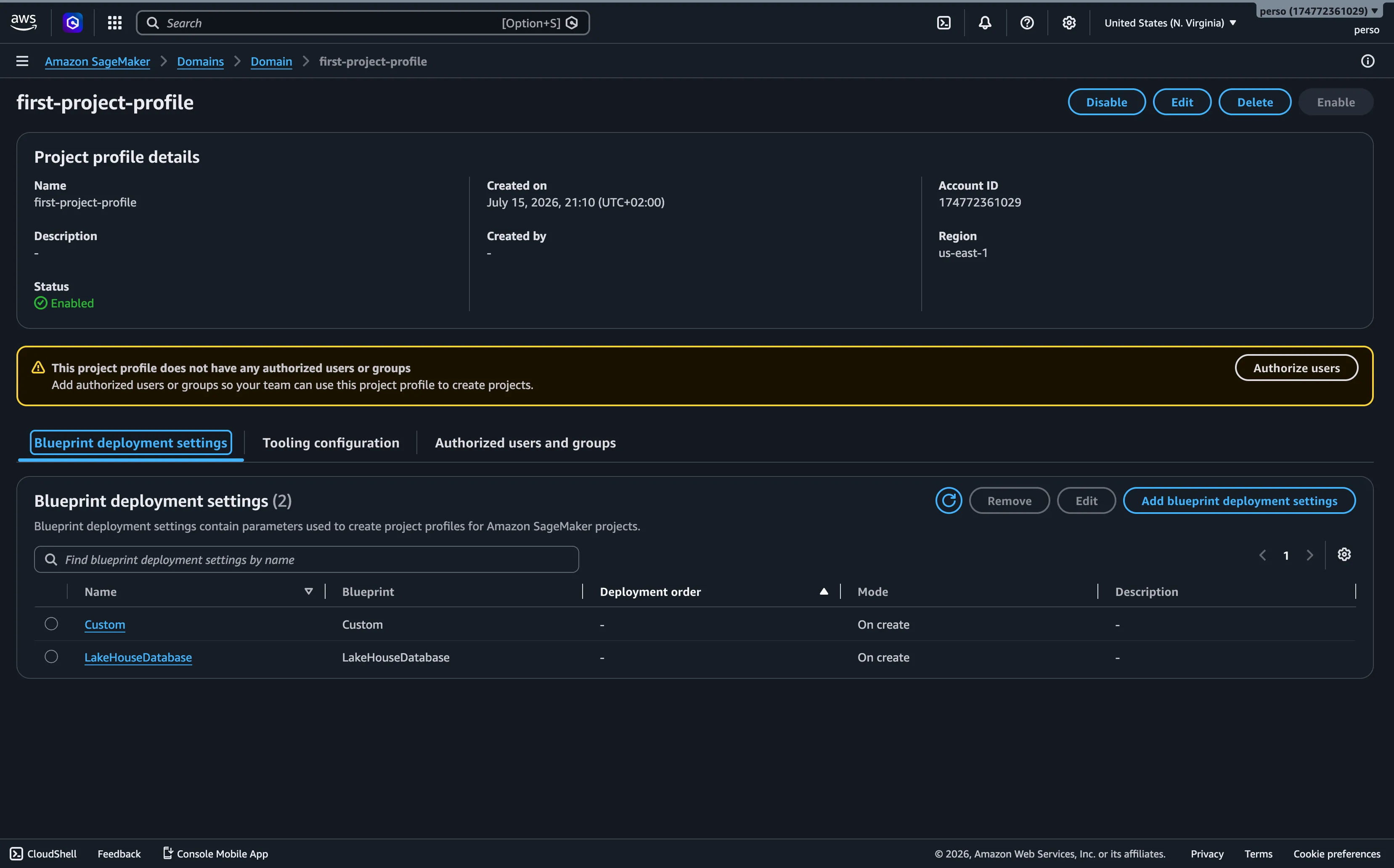
Administrators can perform structural updates to the profile post-creation. This includes altering the regional distribution, modifying target AWS accounts, or changing the deployment order of the underlying blueprints.
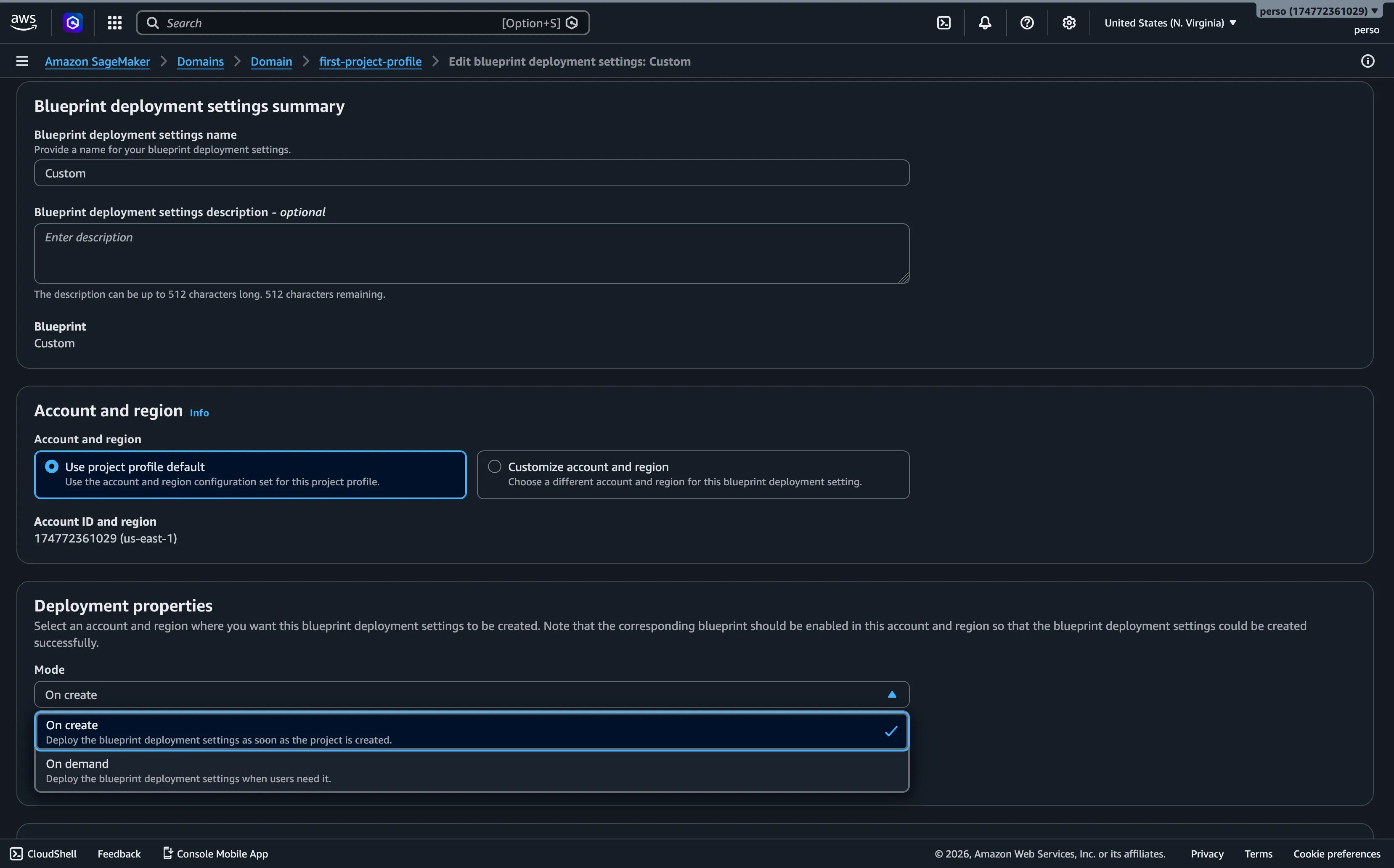
The specific parameters exposed by the integrated blueprints can also be re-configured or locked down within the profile editing interface.
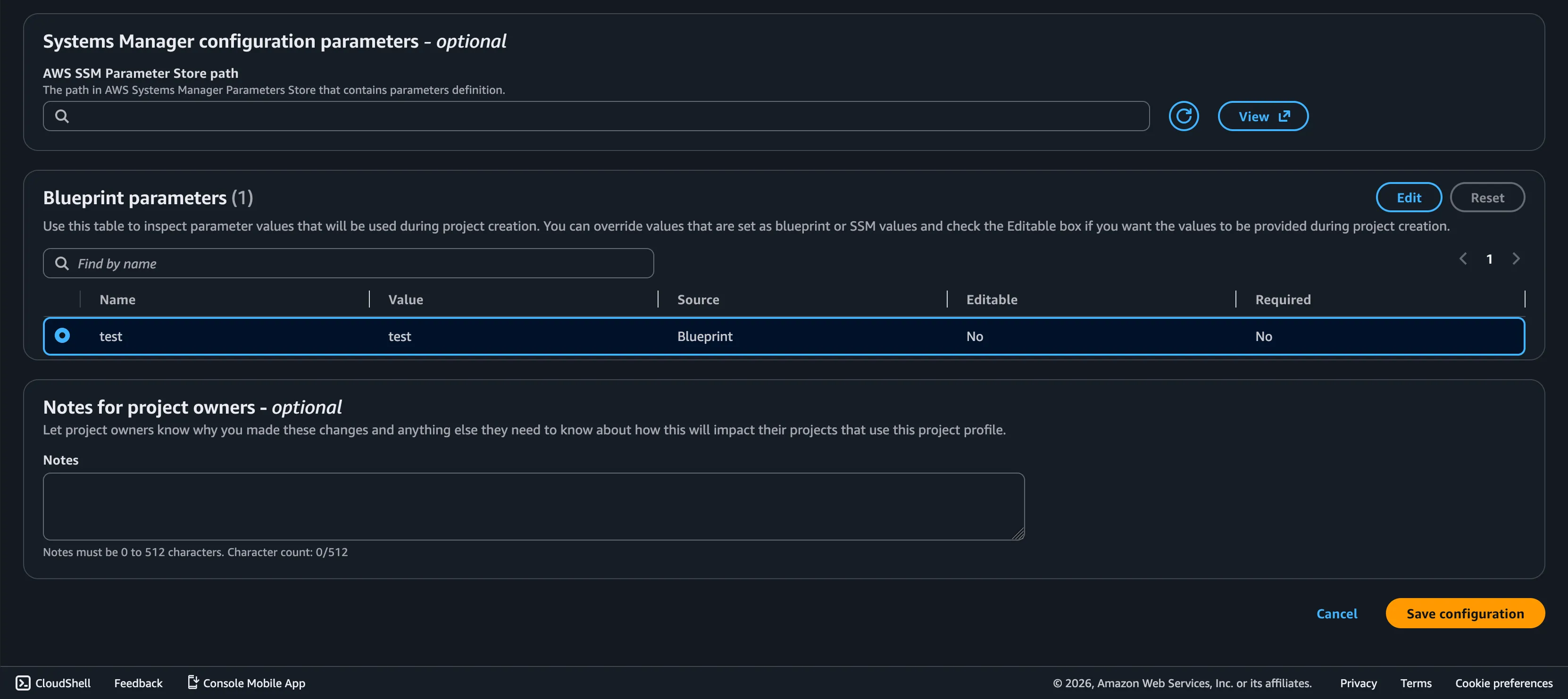
Phase 2: Project Creation & Provisioning Flow
With an active Project Profile in place, users can initiate project provisioning directly through the SMUS domain portal.
The initial creation form prompts the user for a project name, an optional description, and a target Project Profile. The custom profile created in the previous step appears as a selectable foundation.
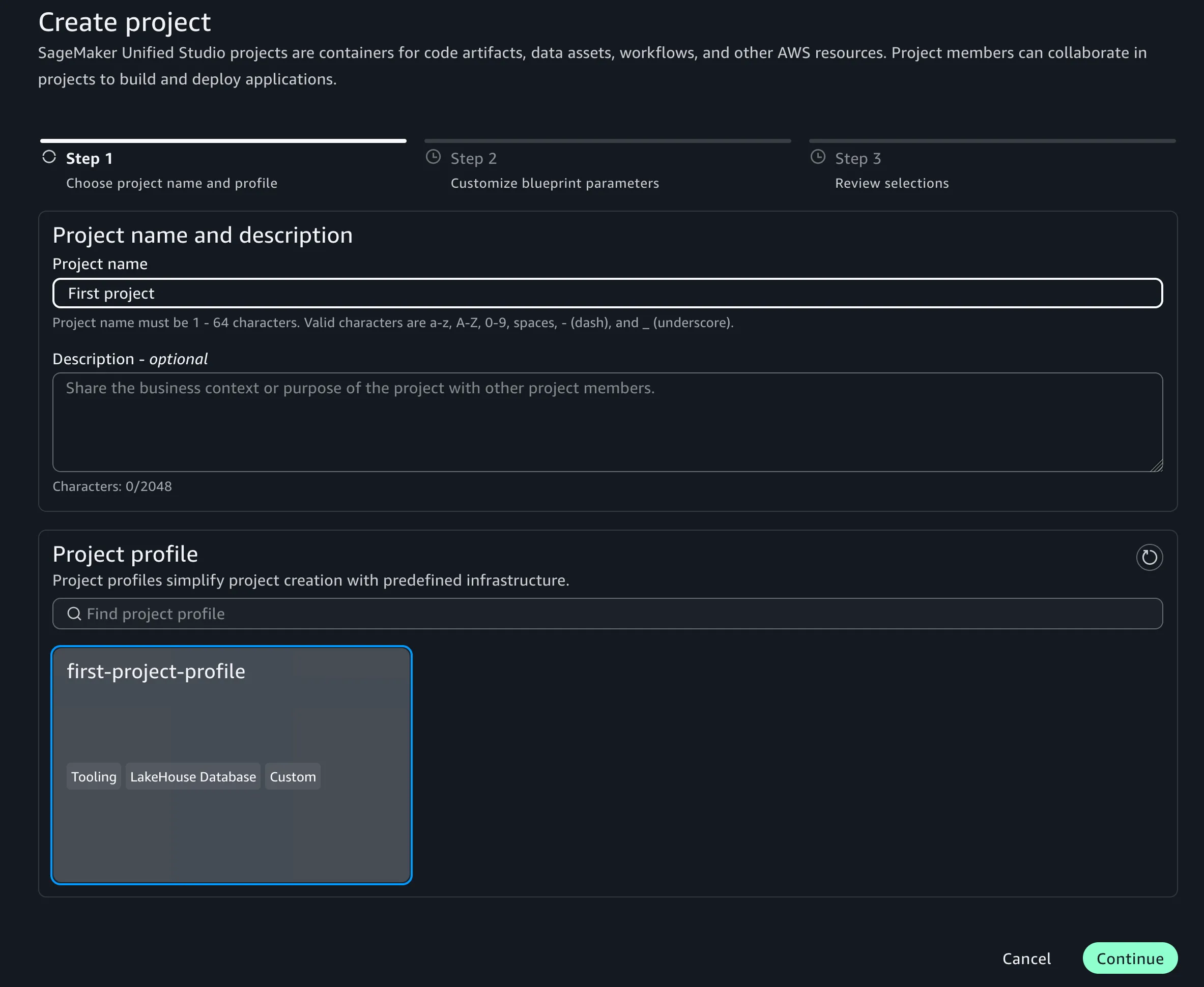
Upon selecting the profile, the system generates a dynamic form requiring the user to supply values for any empty variables or override default blueprint parameters where allowed.
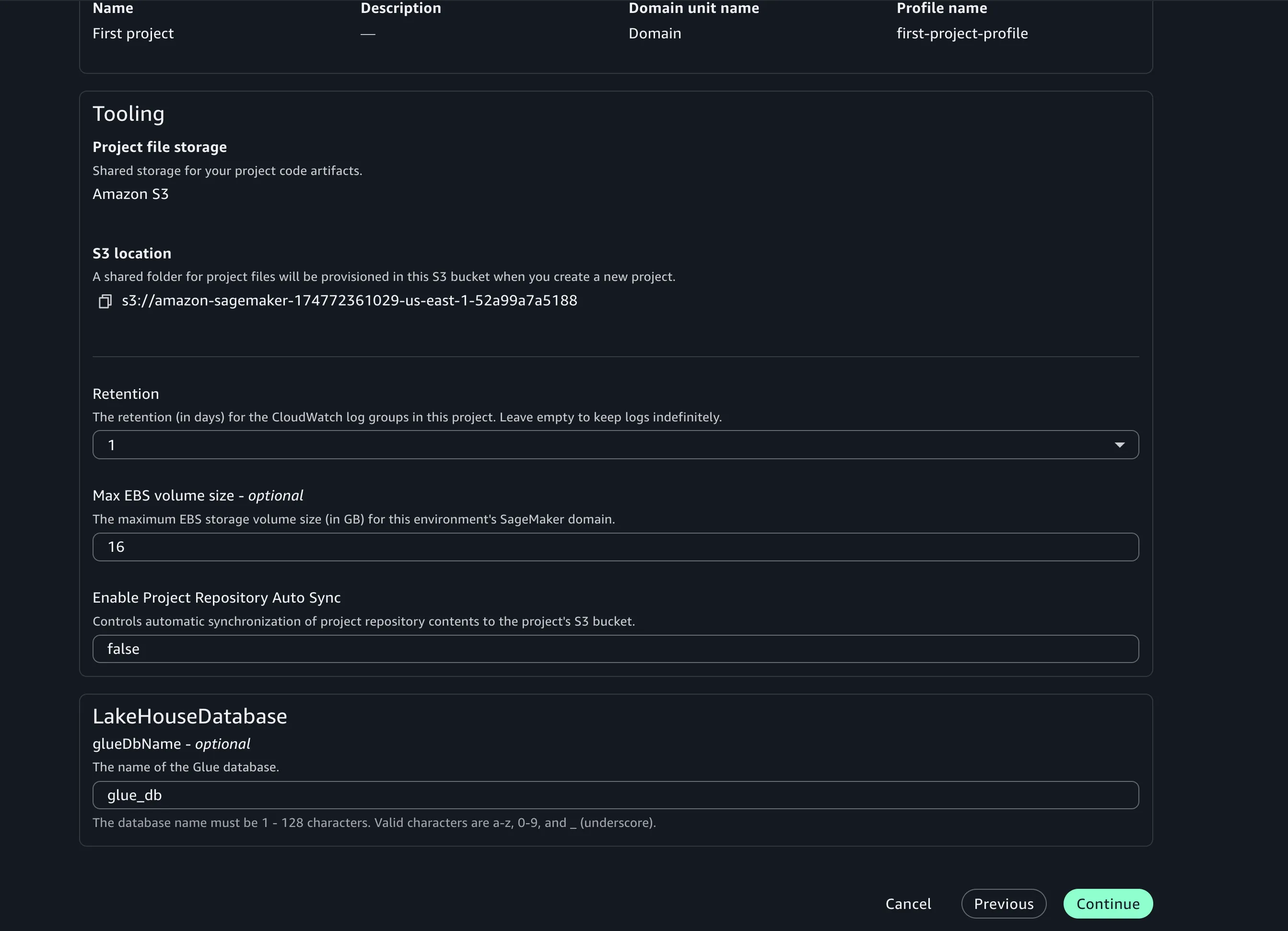
Note on Visibility: If custom blueprint parameters do not appear on this creation form, it is typically because they were explicitly hidden or disabled during the Project Profile configuration phase. They must be configured as editable within the profile to become visible to the end-user.
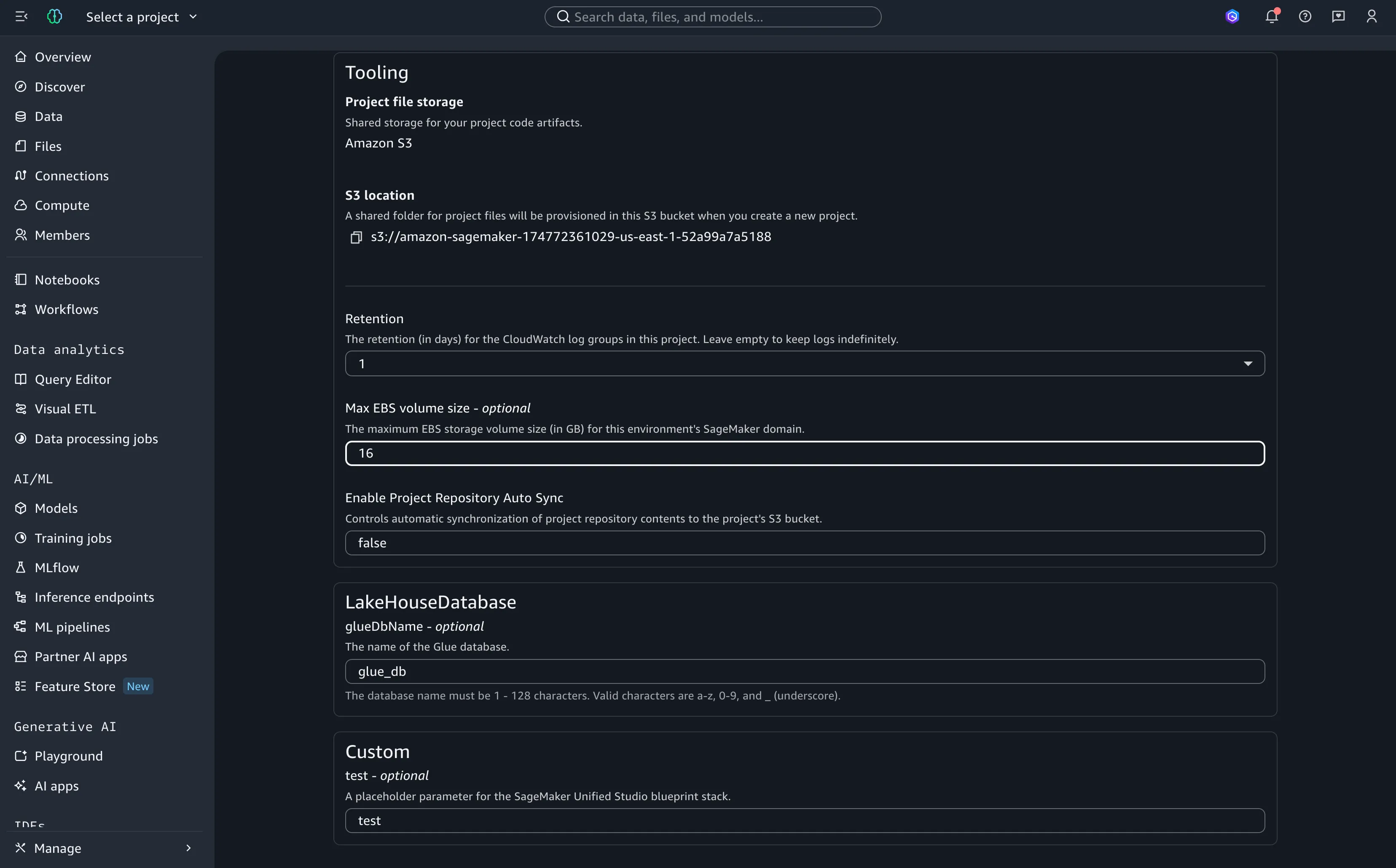
Once the user validates the configuration, the SMUS orchestration engine triggers the deployment sequence. The engine always initializes the environment by provisioning the core tooling blueprint (the base infrastructure stack) before attempting to layer additional features.
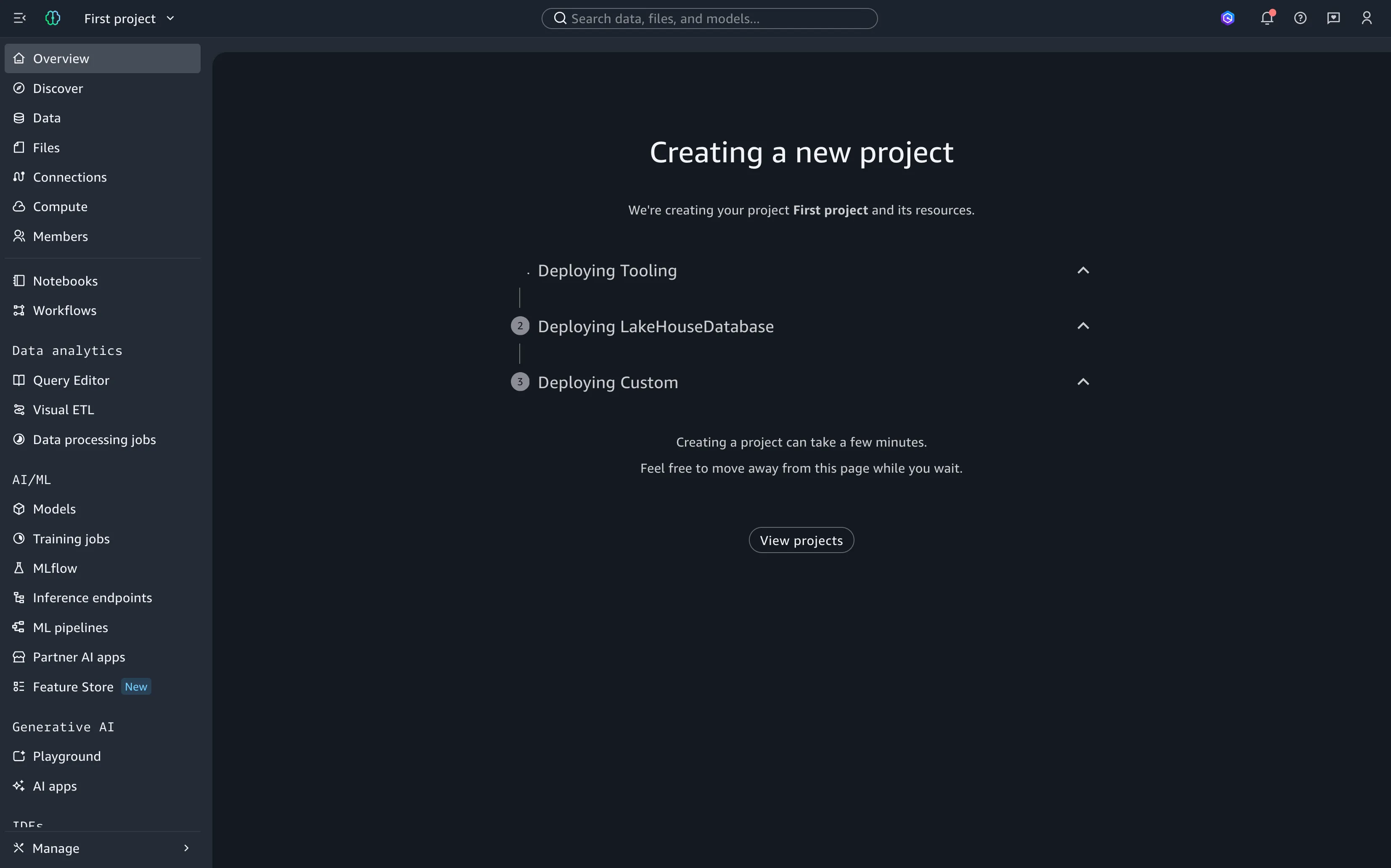
Once the base tooling stack clears, the secondary capability blueprints defined in the profile are deployed sequentially to their respective target workspaces (accounts and regions).
This orchestration takes several minutes to complete. At a minimum, a baseline project with a single capability will provision two separate CloudFormation stacks: one for tooling and one for the capability. When architecting at scale, you must factor this 2+ stack multiplier into your regional AWS CloudFormation stack limits.
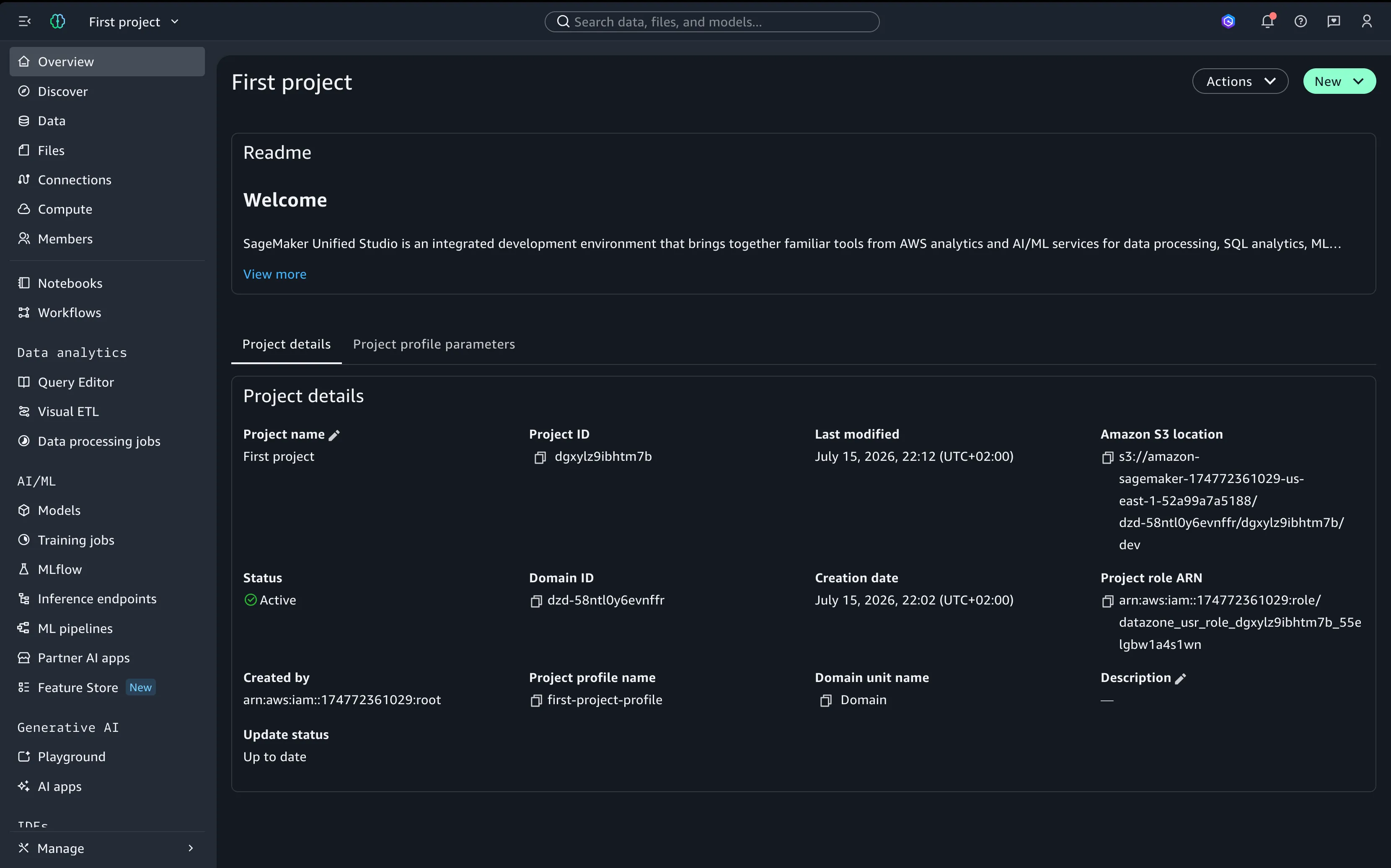
Upon successful deployment, the portal redirects to the project overview dashboard, providing immediate access to membership management, data asset catalogs, and shared analytical workspaces.
Phase 3: Project Mutation & The Update Hook
SMUS projects are mutable; you can update metadata, tweak runtime parameters, and upgrade custom blueprint definitions. However, mutating capabilities requires understanding how SMUS distinguishes between managed and custom blueprints:
- AWS-Managed Blueprints: These templates are immutable by the end-user. Structural updates are managed directly by AWS, though users can modify exposed parameters if permitted by the Project Profile.
- Custom Blueprints: These are fully configurable. Core structures, resource declarations, and input parameters can be updated directly at the blueprint definition level.
SMUS uses a built-in event hook to detect when a project drifts from its underlying definitions. The engine actively listens for changes made to either the global blueprint template or the parent Project Profile. When a drift or version upgrade is detected, a notification banner appears at the top of the project dashboard, accompanied by an explicit Update action button.
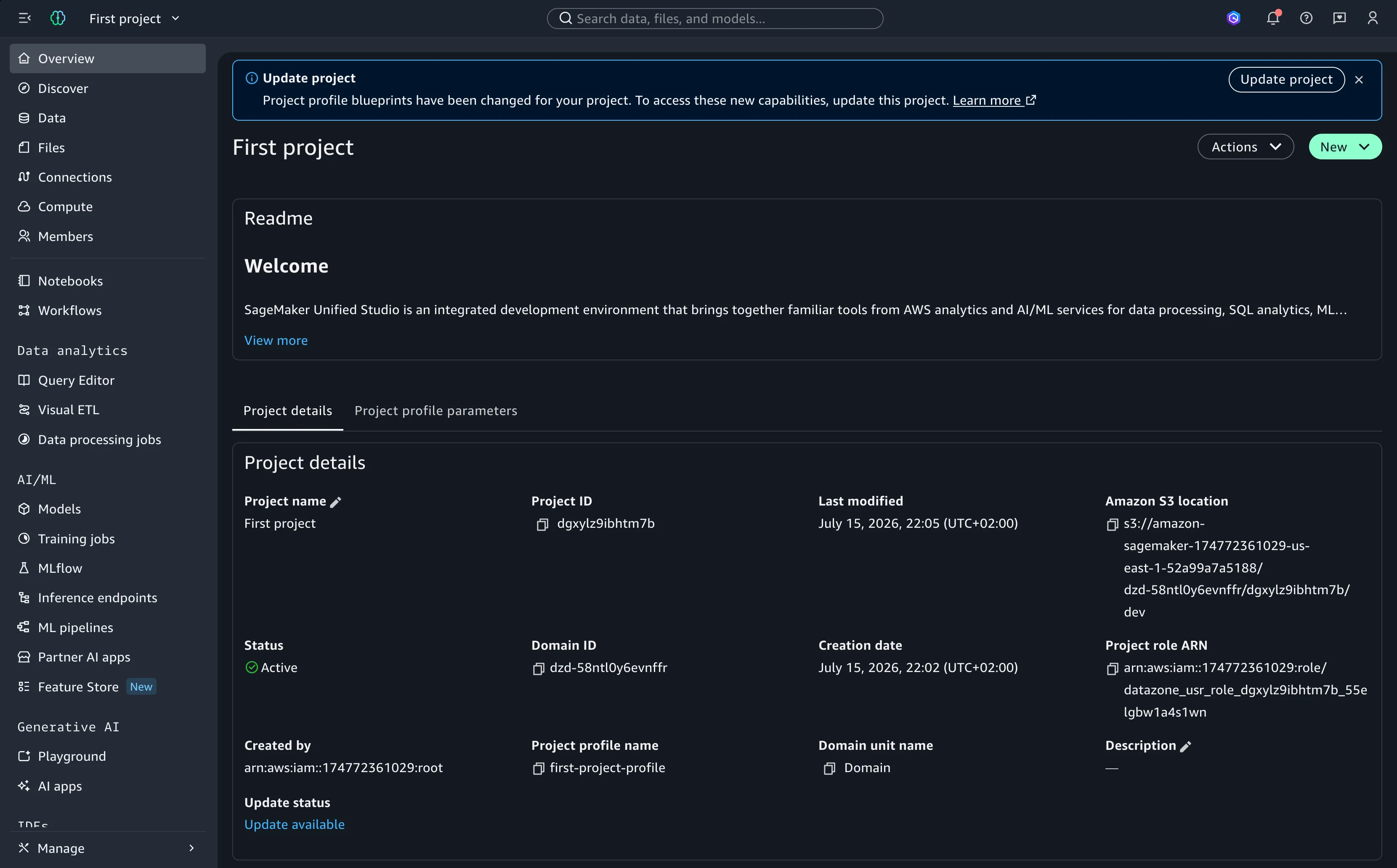
Clicking the update button opens a parameters review form, allowing users to modify inputs or adapt to new template requirements before applying the changes.
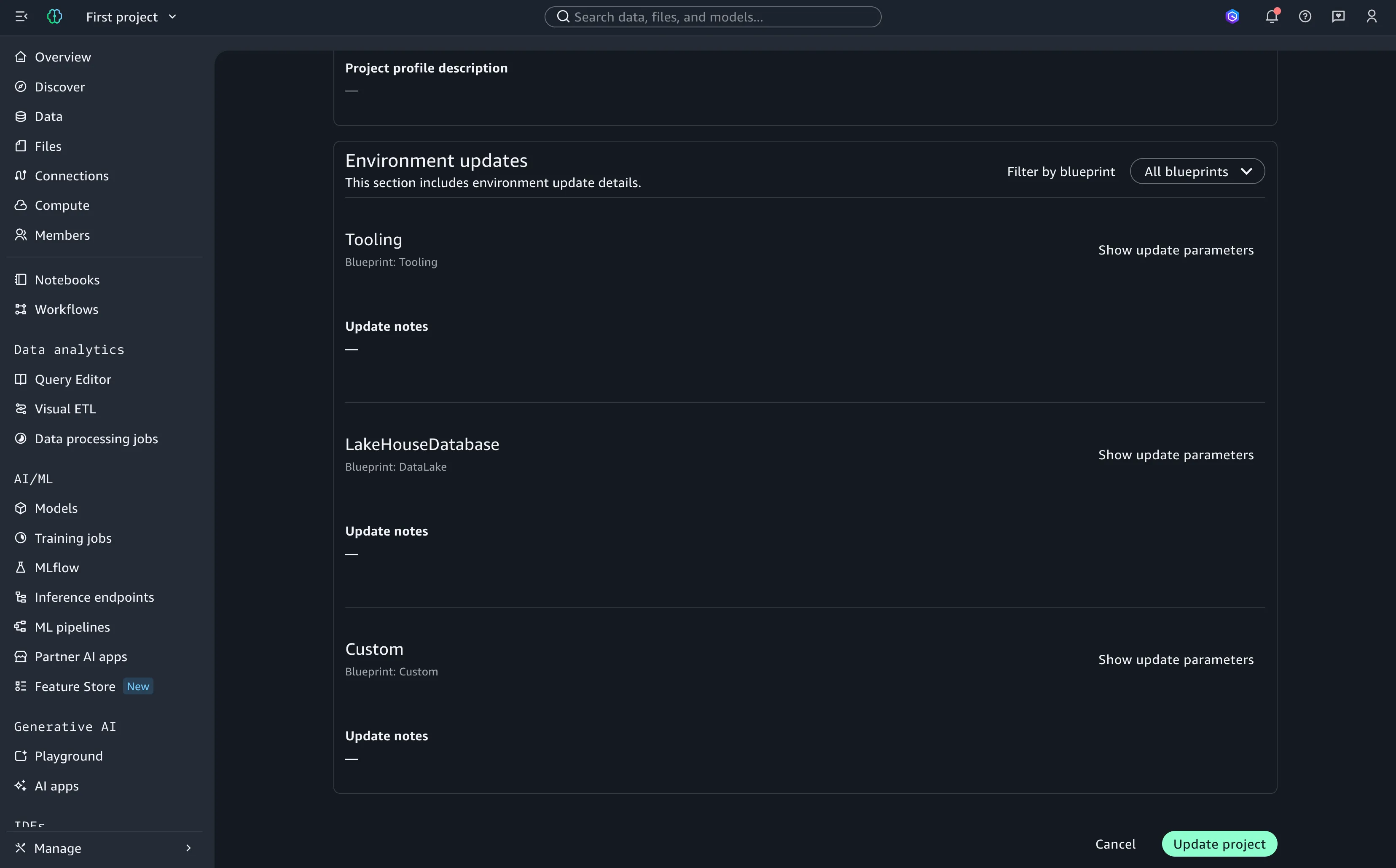
When confirmed, SMUS runs delta updates, targeting only the CloudFormation stacks affected by the modification.
System-Driven Updates: Because AWS regularly updates underlying managed blueprints (including the foundational tooling blueprint), a project update notification may appear even if you have made no local changes. This indicates that a platform-level patch is available to align your base stacks with the latest version.
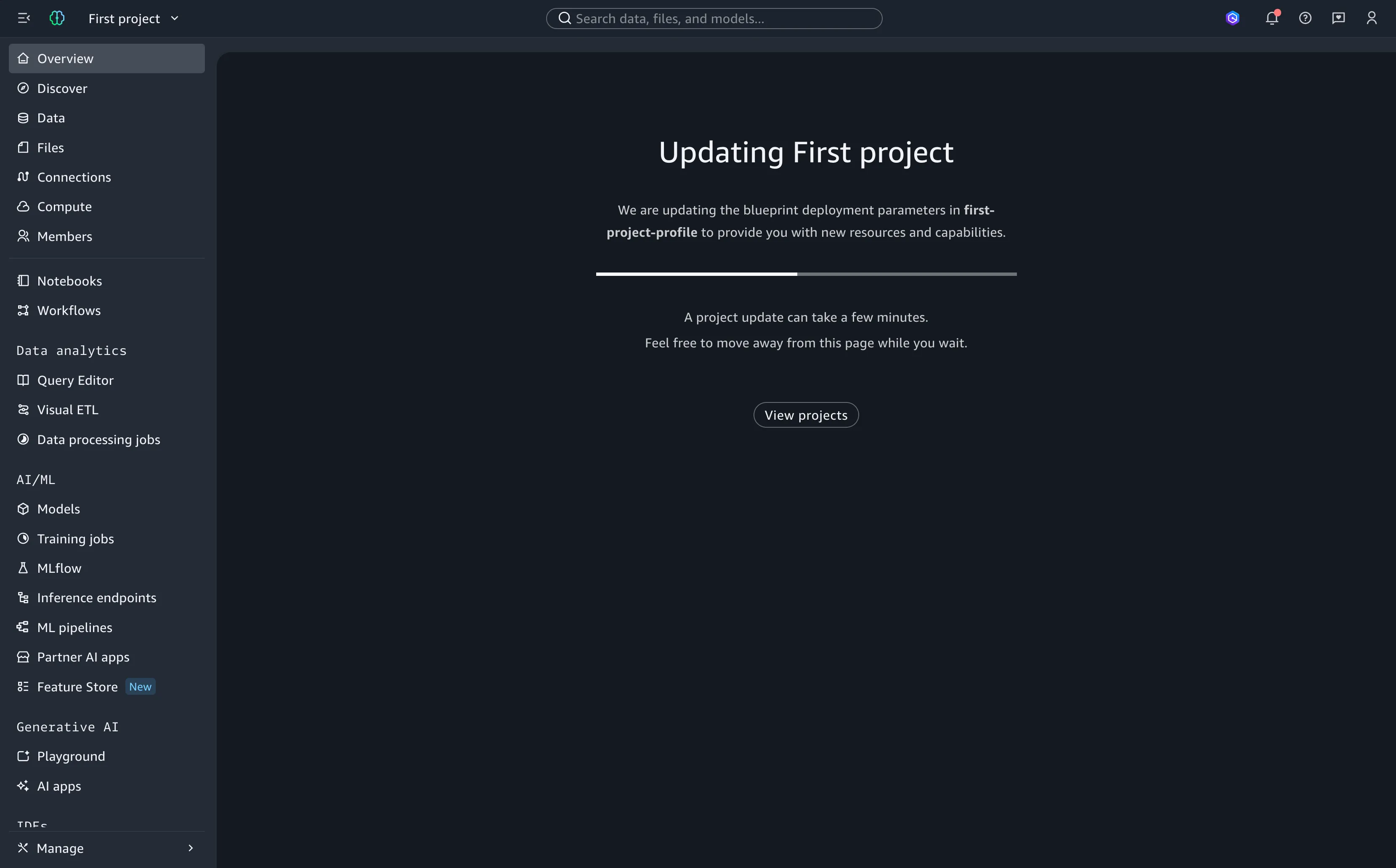
Once the stacks finish updating, the project returns to an active, up-to-date state on the dashboard.
Phase 4: Deletion & Resource Retention
To tear down a SMUS project safely, best practice dictates cleaning up external dependencies—including active data subscriptions, public asset listings, and shared catalog permissions—before executing the deletion command.
The teardown sequence mirrors the creation process in reverse: SMUS unprovisions capability stacks one by one before destroying the root tooling stack.
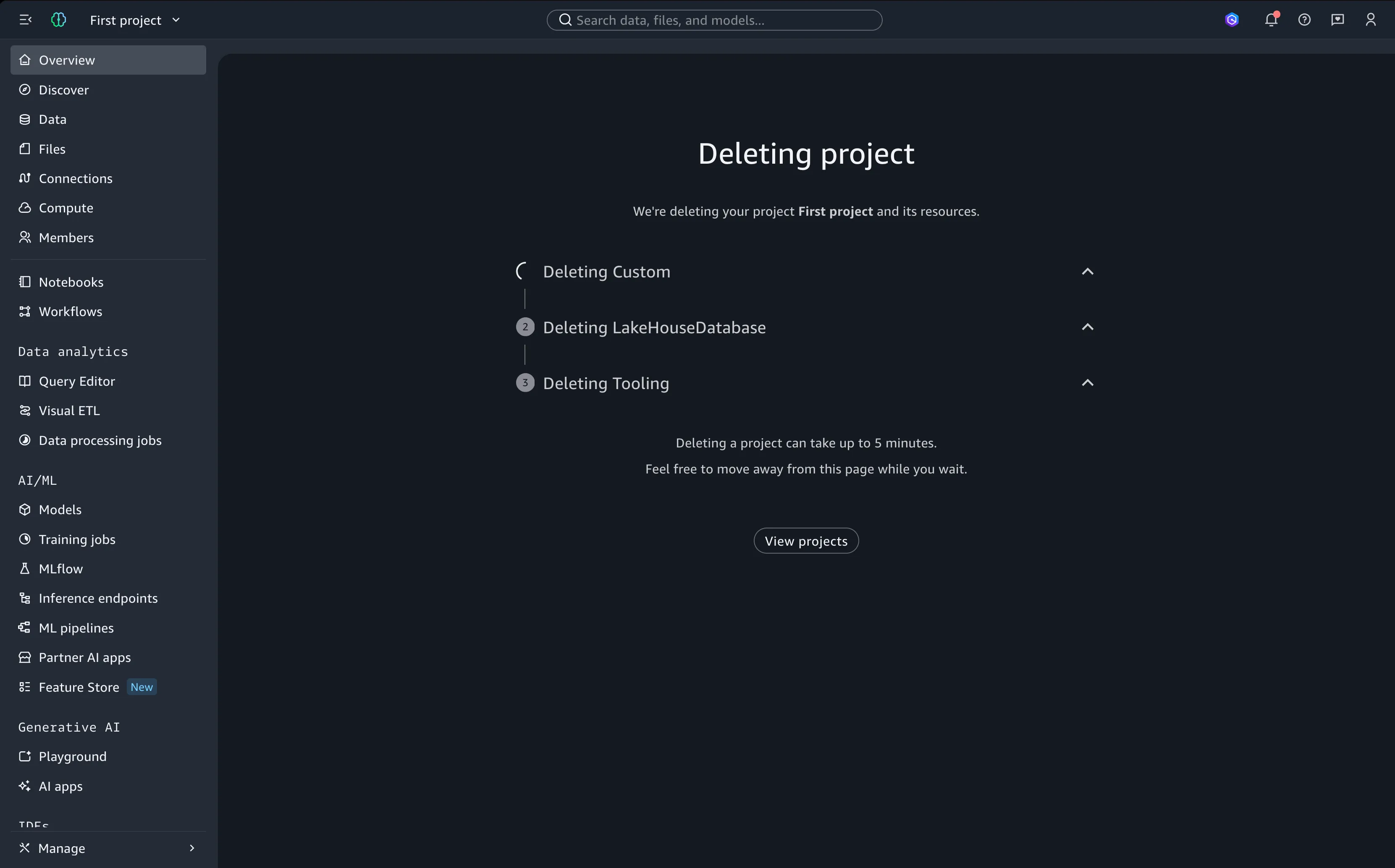
Critical Caveat: Underlying stateful data stores, such as Amazon S3 physical buckets or AWS Glue/Redshift databases, frequently apply a
Retaindeletion policy. SMUS destroys the logical orchestration stacks, but the physical data resources often remain intact within the target account. You must account for these orphaned resources during post-deletion cleanup.
4. Operational Considerations & Scale Gotchas
Because SMUS coordinates infrastructure across multiple services, maintaining visibility requires an understanding of its underlying dependencies and platform constraints.
The Underlying Infrastructure Mesh
SMUS does not operate in isolation; it functions as an orchestrator across several core AWS services:
- AWS CloudFormation (CFN): Handles physical resource provisioning.
- AWS Lake Formation (LF): Manages data access policies and security metadata.
- AWS Resource Access Manager (RAM): Drives cross-account and cross-region sharing.
- Supporting Data/AI Services: Glue, Redshift, Amazon SageMaker, and Amazon VPC.
When deploying custom capabilities at enterprise scale, you must actively track soft and hard resource limits across all integrated services. Be mindful of regional VPC/subnet capacities, IAM role quotas per account, concurrent CloudFormation stack limits, and Lake Formation administrator ceilings.
Every new project automatically scales your footprint across all of these areas:
- AWS CloudFormation (Min. 2 Stacks per Project/Capability)
- IAM Roles (Execution, Tooling, and Capability Boundaries)
- AWS Lake Formation (Permissions, Grants, Admin Registrations)
- AWS RAM (Cross-Account Shares & Cross-Region Resource Links)
- Amazon VPC Security Groups (Private & Inter-Region Access)
- Data/AI Endpoints (Glue Catalogs, Redshift Clusters, SageMaker Instances)
Access Isolation & Lake Formation v5
AWS recommends aligning your domain with AWS Lake Formation v5, which contains the most granular access controls (using regex) and a unified logical group for AWS RAM shares. This is crucial to define before scaling to avoid having multiple subscription versions on the same domain.
An inventory of the resources managed or provisioned via SMUS must be maintained to address two points:
- Safe cleaning of projects.
- Ensuring that interacting services do not present integration errors.
Shared Responsibility and Flexibility
SMUS offers a wide layer of customization. Project parameters are overridable at three distinct levels:
- Blueprint (if custom)
- Project Profile
- Project Creation / Update
This architecture keeps choices open. If a managed blueprint is chosen, administrators can constrain administrative parameters at the profile layer while leaving operational parameters editable by the user.
However, this means you are entirely responsible for designing a safe, scalable structure. For example, you must be aware of the unicity of subscription target roles per project on SMUS. The service naturally restrains access per project and relies on domain-sharing mechanisms to provide supplemental access. This is manageable outside the SMUS ecosystem since you can manipulate the underlying governance services (IAM, LF, RAM) directly. It is empowering but requires deep knowledge to architect correctly.
The Custom Blueprint Parameter Gotcha
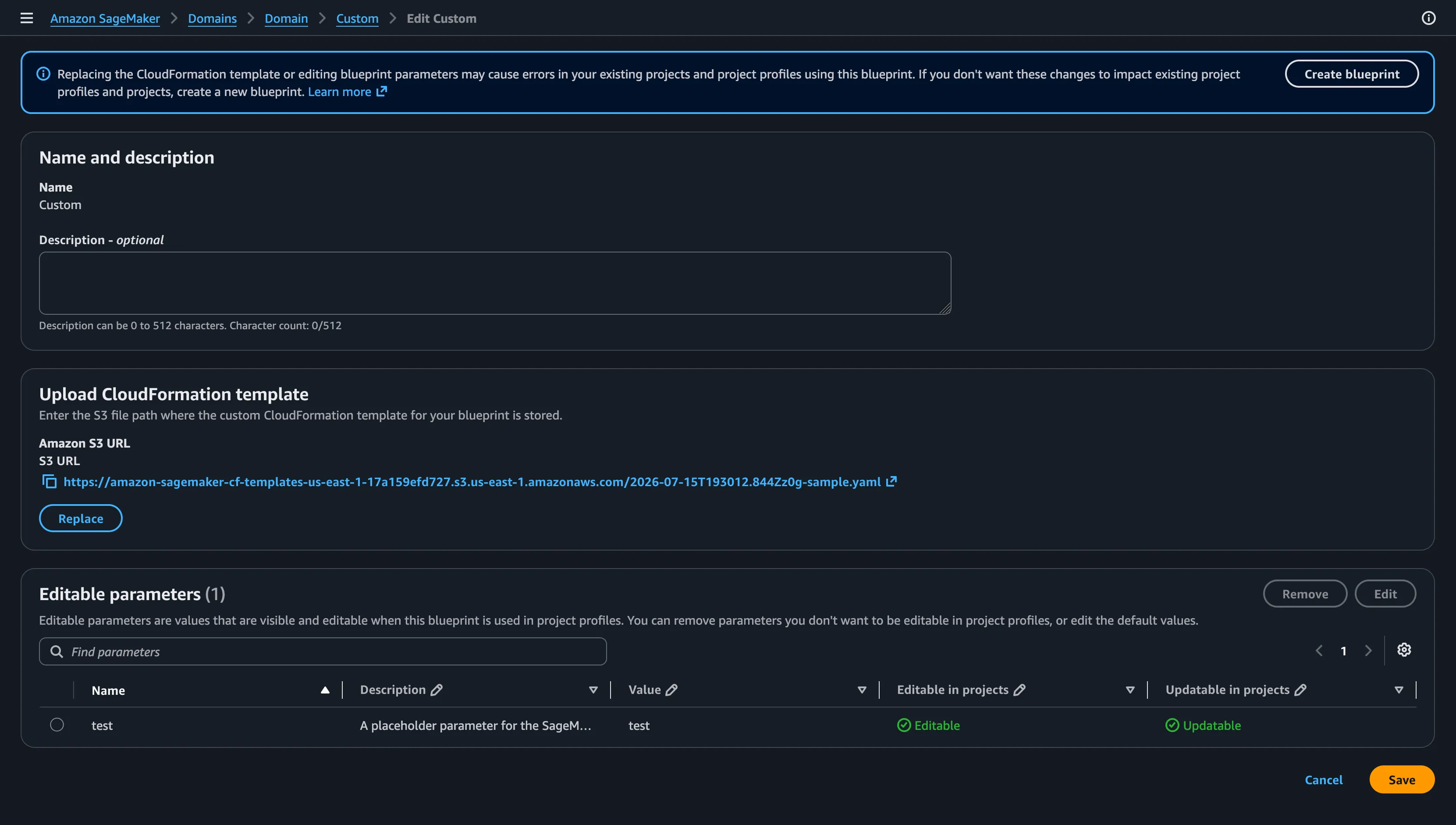
Another major consideration involves custom blueprints. When selecting a blueprint stack, SMUS does not fully compile or validate the CFN stack—meaning it will not strictly check if the CFN stack is structurally valid for an update.
Consider pushing the standard template below via a custom blueprint, for an update which only adds the "test2" parameter to the template.
Blueprint CFN Sample
On native CloudFormation, you cannot update a stack if the only change is a new parameter in the parameters section (CloudFormation API refuses the stack, stating invalid usage).
However, if that same parameter-only update is given to SMUS, it will not raise any error on the landing pages or the domain UI. You will even be able to trigger a project update.
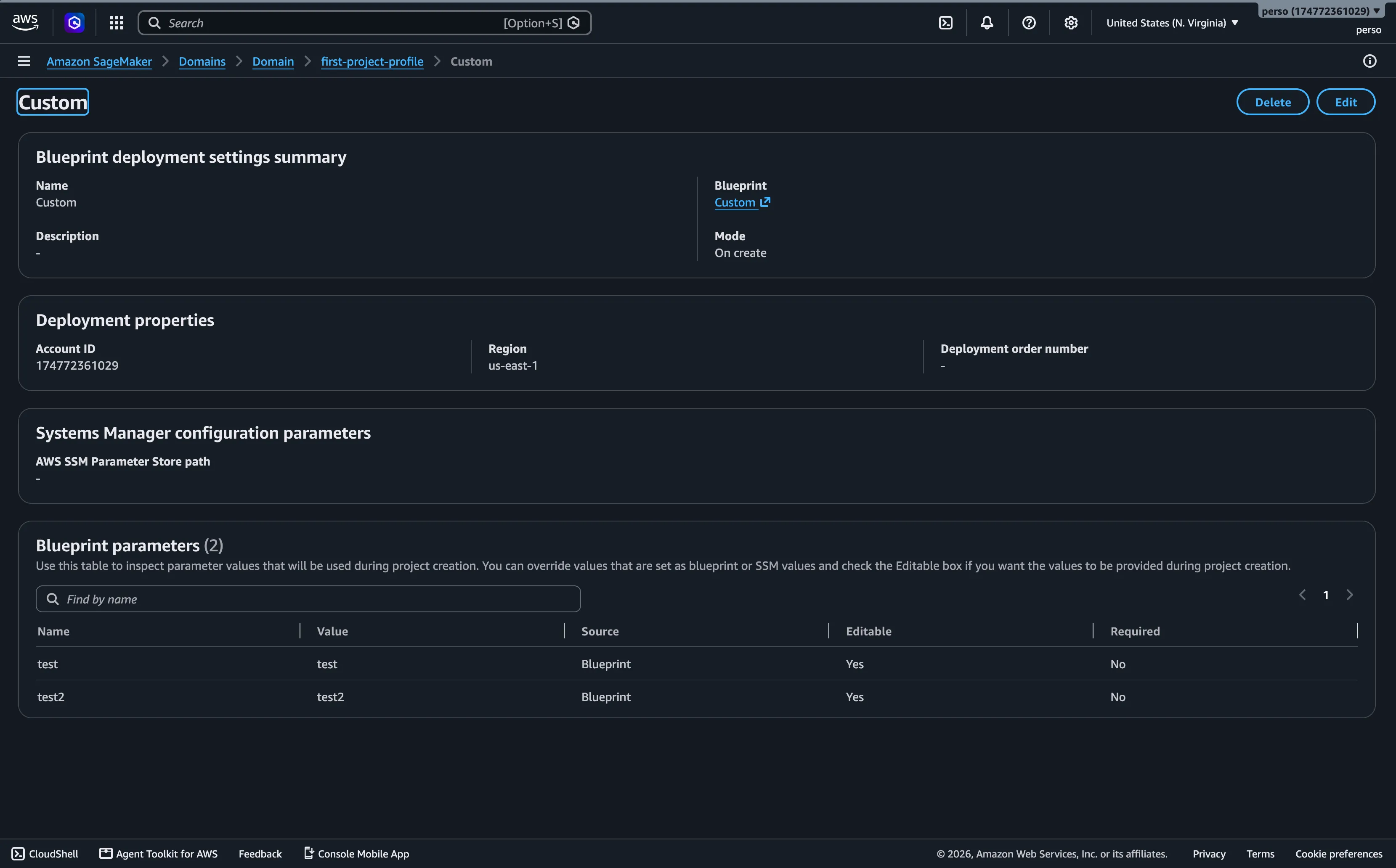
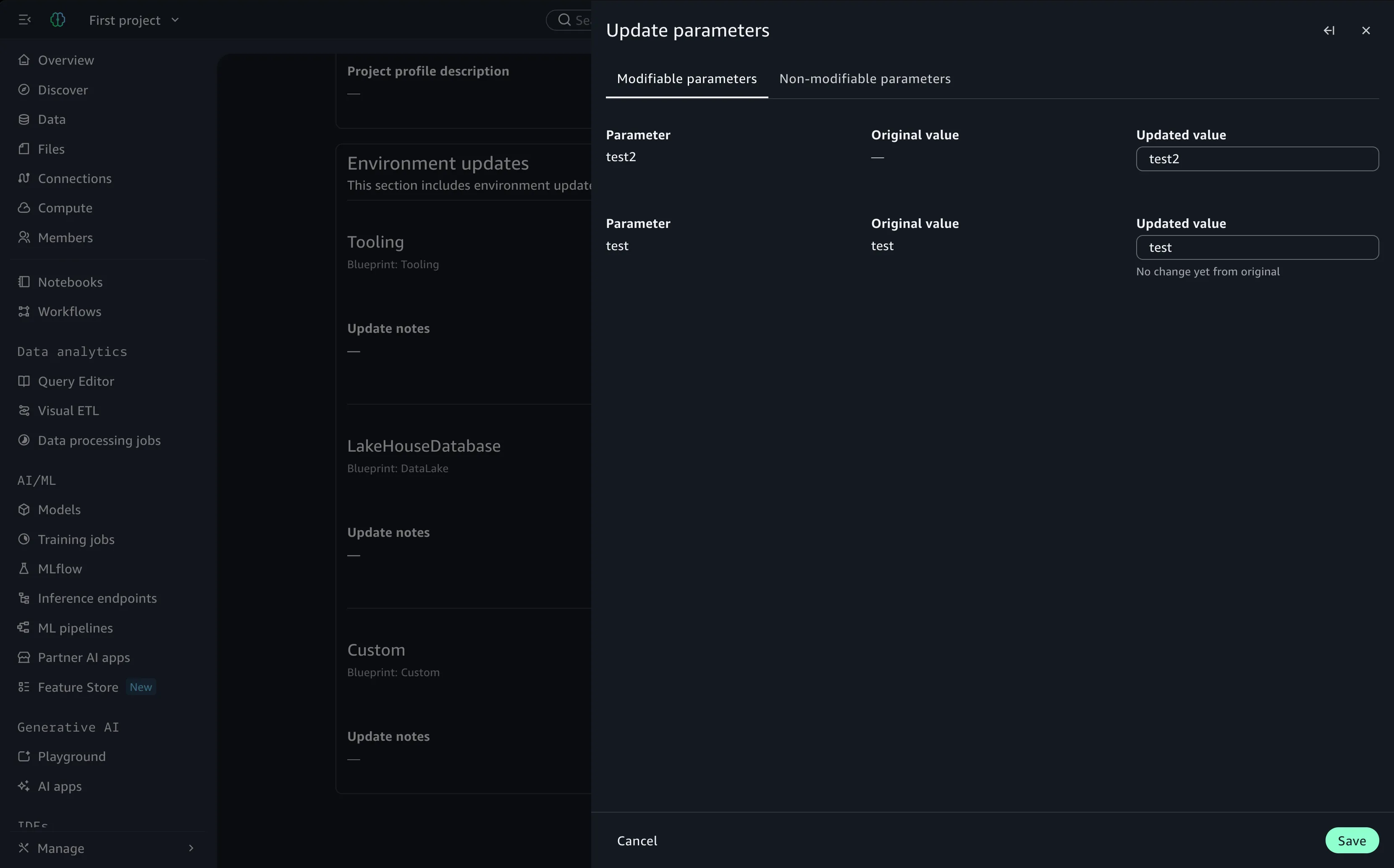
The update will report as successful on SMUS, and you will see the new parameter reflected in the UI.
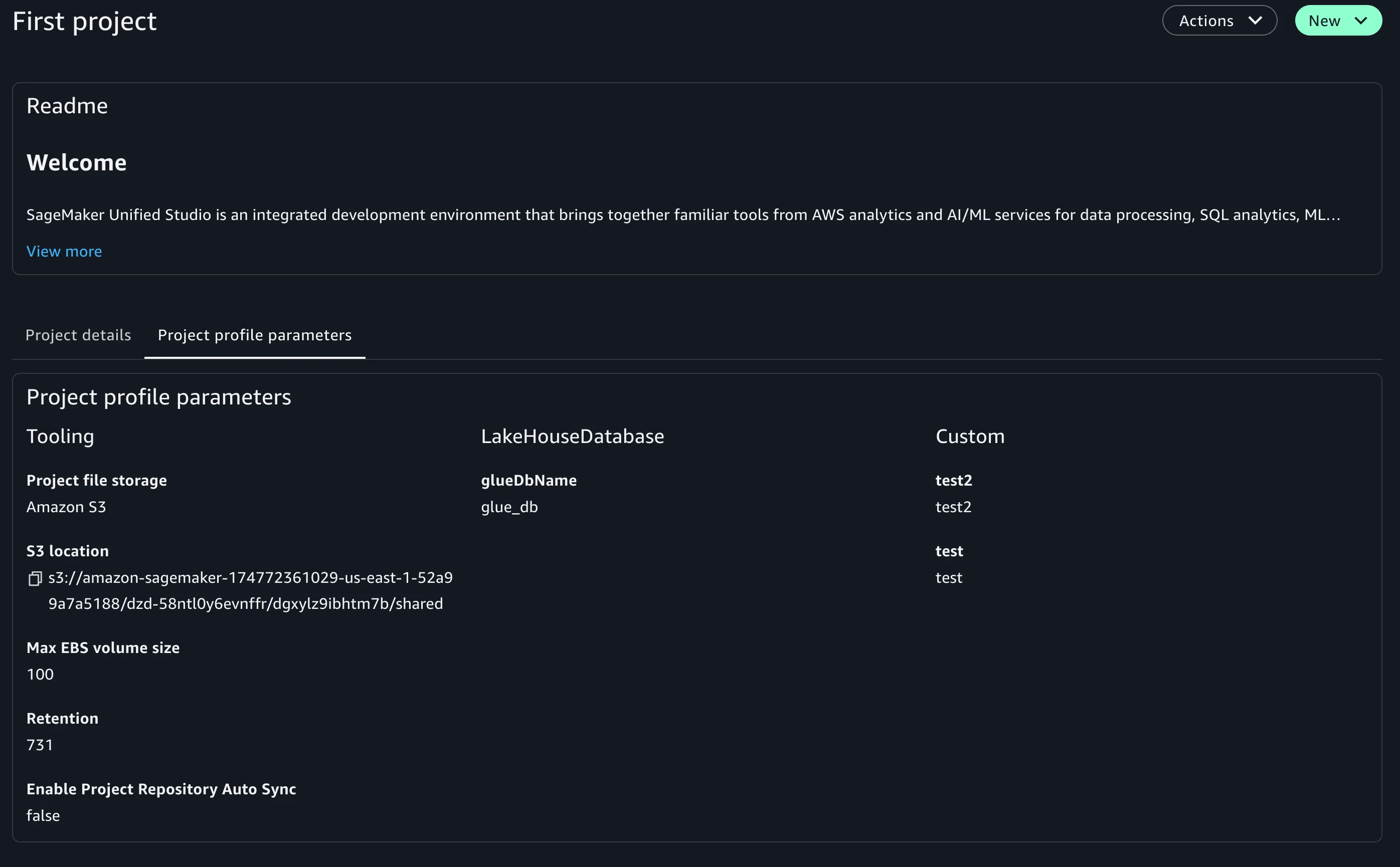
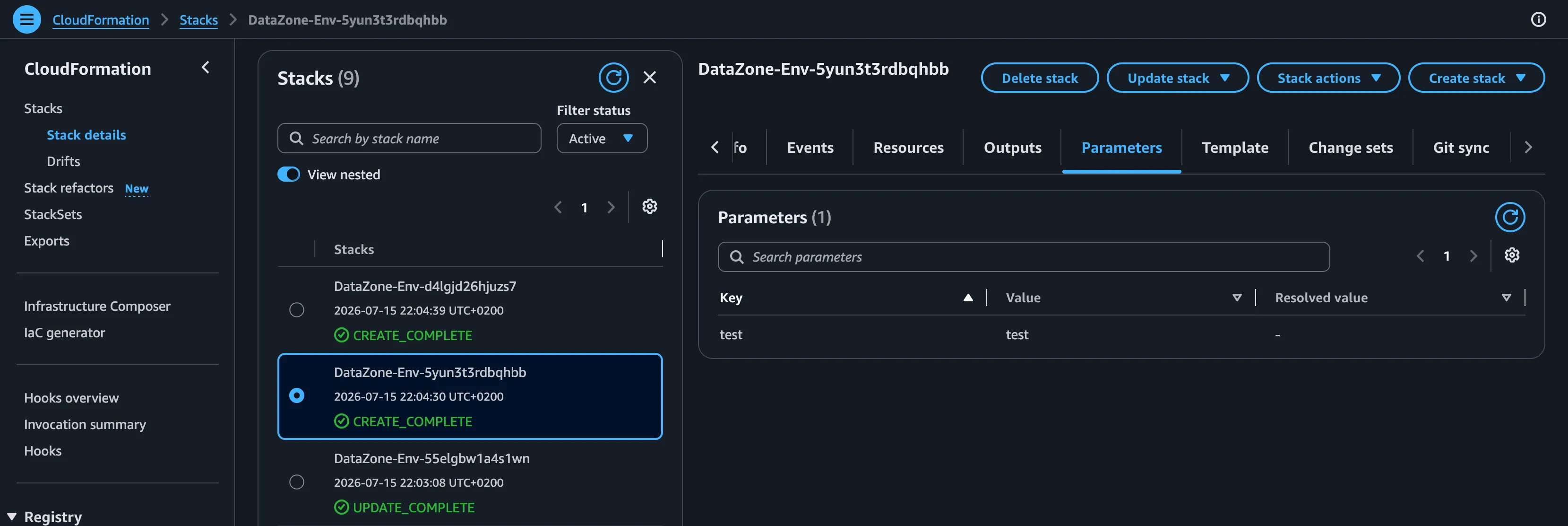
However, on the underlying CFN stack, no update is actually triggered, and the parameter listed on the SMUS UI will not be added to the stack.
If you check AWS CloudTrail, you will find the API calls incoming from SMUS (twice) using the correct permissions, but rejected by the CloudFormation API simply because the change lacked a valid resource modification.
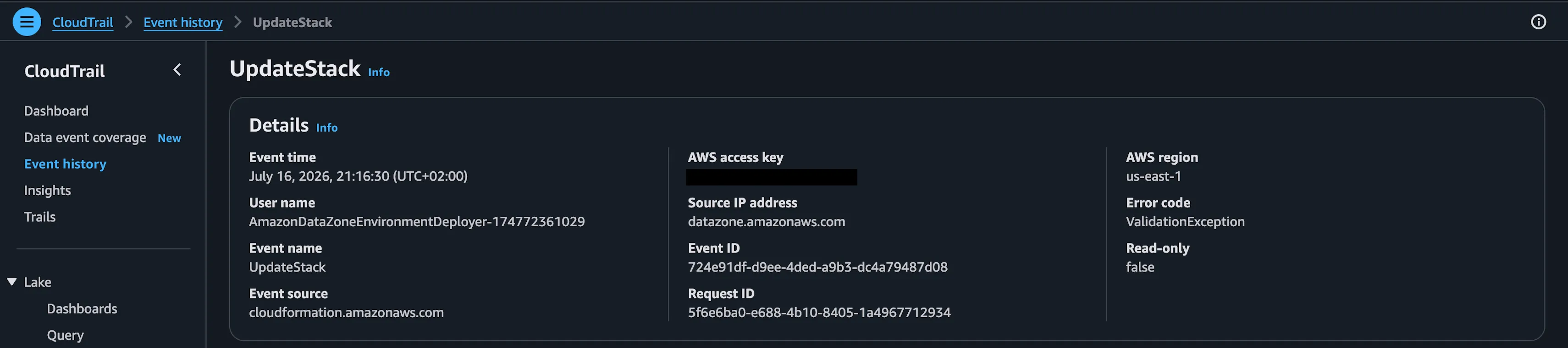
At this point, the parameters of the blueprint inside the SMUS project are out of sync with the actual deployed CFN stack. Adding or modifying a physical resource in the template will solve this disparity.
For this reason, a strong best practice is to validate and provision your custom blueprint as a test directly on CloudFormation before updating SMUS, especially when working at scale or running batch updates.
Debugging Framework
This scenario is prone to happen with integrated services. To maintain visibility:
- Use browser dev tools (Network tab) on the domain UI to figure out the exact API calls being used.
- Use AWS CloudTrail on the workspace account to understand exactly what goes wrong during project creation or core operations.
- Deeply understand AWS Lake Formation and AWS RAM to smoothly manage subscriptions across accounts and regions.
This shared responsibility model makes SMUS incredibly powerful for nearly all data architectures, provided you approach it with a deep understanding of its underlying API subtilities.