Building a BigQuery Agent with Google ADK
Building a BigQuery Agent with Google ADK
My goal is to provision an agent on GCP using the ADK SDK. The framework offers a lot of interesting capabilities, and I wanted to understand and test them hands-on.
An agent is an LLM chat assistant capable of taking actions, mainly through tools and other helpers such as an orchestration layer. On an agent, we can configure MCP tools and dedicated skills, and this is what the Google ADK SDK makes easy today.
On top of that, ADK provides a clear instruction model that is easy to onboard and design with. It exposes model configuration and even model parameters, making it a flexible framework that can define almost any agent behavior.
The method I already knew for provisioning an agent was general purpose containers on Cloud Run. Cloud Run is managed, but it requires setting up the infrastructure behind it, session management and persistence for chat history, and memory persistence for RAG or long context memory. More on that in the next articles.
Vertex AI's agent offering is now the Gemini Enterprise Agent Platform. It provides a dedicated agent runtime that already handles agent specific features, with a wide range of capabilities to support provisioning and development, and it comes with full ADK support.
In this article I will showcase a demo agent built with ADK. The agent's capabilities are not the subject here, but I will use a small BigQuery data assistant to prove most of them. The article focuses on ADK framework usage with Python code. Deployment of this agent with agents-cli on both backends, Cloud Run and the Agent Platform runtime, will be covered in the next article.
ADK SDK
ADK stands for Agent Development Kit, and as its name states, it is a helper toolset to build agents quickly with full provisioning support on GCP.
The framework can be used with multiple languages: Python, Java, and Go. I am most comfortable with Python, so I chose to build my agent with the Python ADK.
I focused mainly on two components in the code: Agent and Runner. The runner is mostly implicit in this example. It orchestrates the agent and its actions, which is the orchestration layer of the framework.
Agent defines the configuration and instructions of the agent to create:
name: the agent name.model: the model name.instruction: the first definition of instructions. It supports environment variables and even optional placeholders like{opt_var?}.tools: the tools available to the model. It accepts MCP tools, skill tools, and even other agents, which enables dedicated calls to subagents.output_schema: fixes the output to a defined schema, so clients using the agent know exactly what to expect.generate_content_config: advanced model configuration covering temperature, max output tokens, and several other options. In this example the parameters are tuned for the agent's purpose: a deterministic temperature, scoped tokens, and adapted cache values.
Other useful properties:
description: the agent description.input_schema: likeoutput_schema, it scopes, monitors, and rejects input that does not match the schema.include_contents: enabled by default, it lets the agent access the conversation history of the session, which is how the model keeps context from previous turns.
Agent definition
All of this configuration helps create a capable agent for high input workloads or light interactions, depending on its purpose. The framework gives a single configuration entry point for the agent. And because the configuration lives in a programming language rather than a configuration file, several behaviors can be customized or programmed directly.
Tools configuration
ADK supports custom tools directly on the agent. Adding a native Python function to the agent's tools list is enough. For example, I can pass this function directly:
Custom tool
The Agent Platform also offers a set of managed MCP servers and fully supports ADK, so an agent can pull managed MCP servers directly.
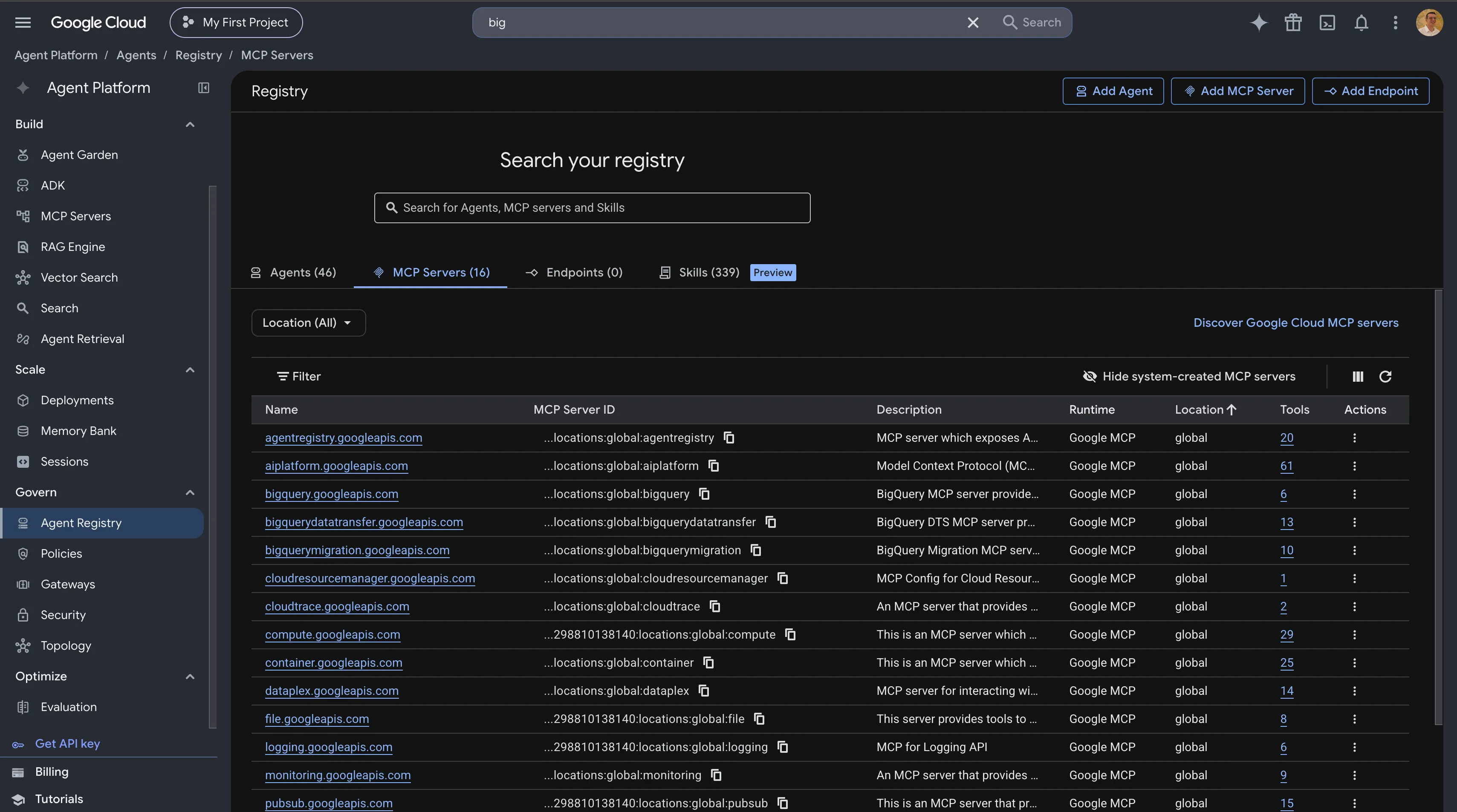
I had 16 managed MCP servers available by default to enrich my agent. Since it will be a BigQuery assistant, adding the BigQuery MCP server makes sense: it gives the agent direct access to tools that explore and query BigQuery, created and managed by Google Cloud.
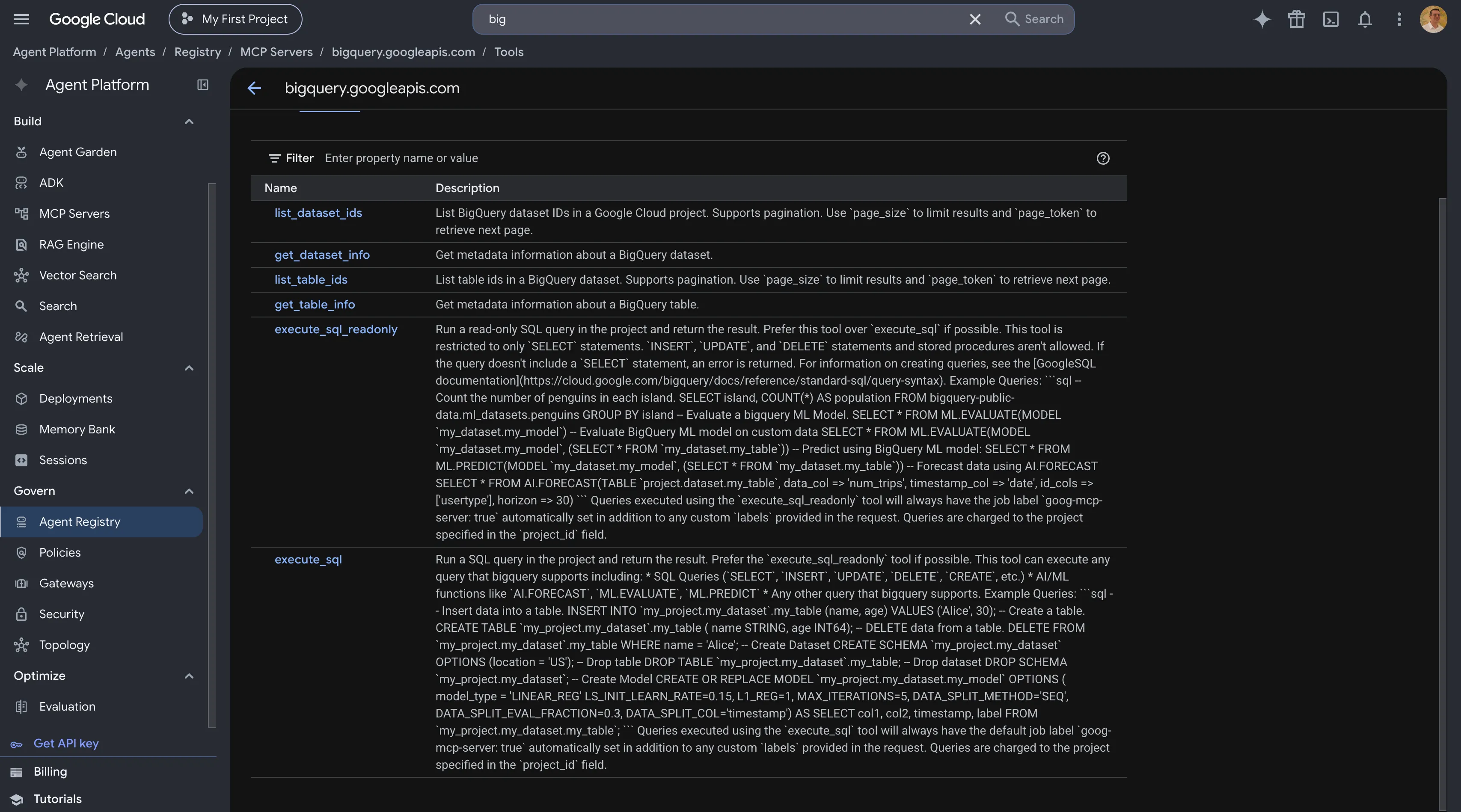
As you can see in the figure above, it offers read-only query execution and standard query execution, plus read functions to explore the necessary resources and ids.
So instead of writing the full set of tools myself, I can use this managed MCP server directly and integrate it with ADK:
Managed BigQuery MCP integration
The MCP setup is simple, but this MCP server calls the BigQuery API, so it must be authenticated. Intuitively I assumed it would authenticate automatically once I attached a service account to the agent, but that is not the case: every call to the managed MCP server needs its own bearer token. I opted for a scoped credential on the BigQuery scope, with a header for billing attribution and a token refreshed on each call. This avoids token expiry after one hour and keeps the agent functional during long running sessions.
With these components, bq_mcp is initialized and passed directly to the agent's tools list.
Skills
An agent built with ADK can also take skills as input. Skills are injected through a dedicated tool called SkillToolset, which groups the input skills and gives the agent functions to read them.
I can load custom skills I already wrote using an ADK helper function:
Load a custom skill
I can also use managed skills, which are discoverable on the Agent Platform in the agent registry.
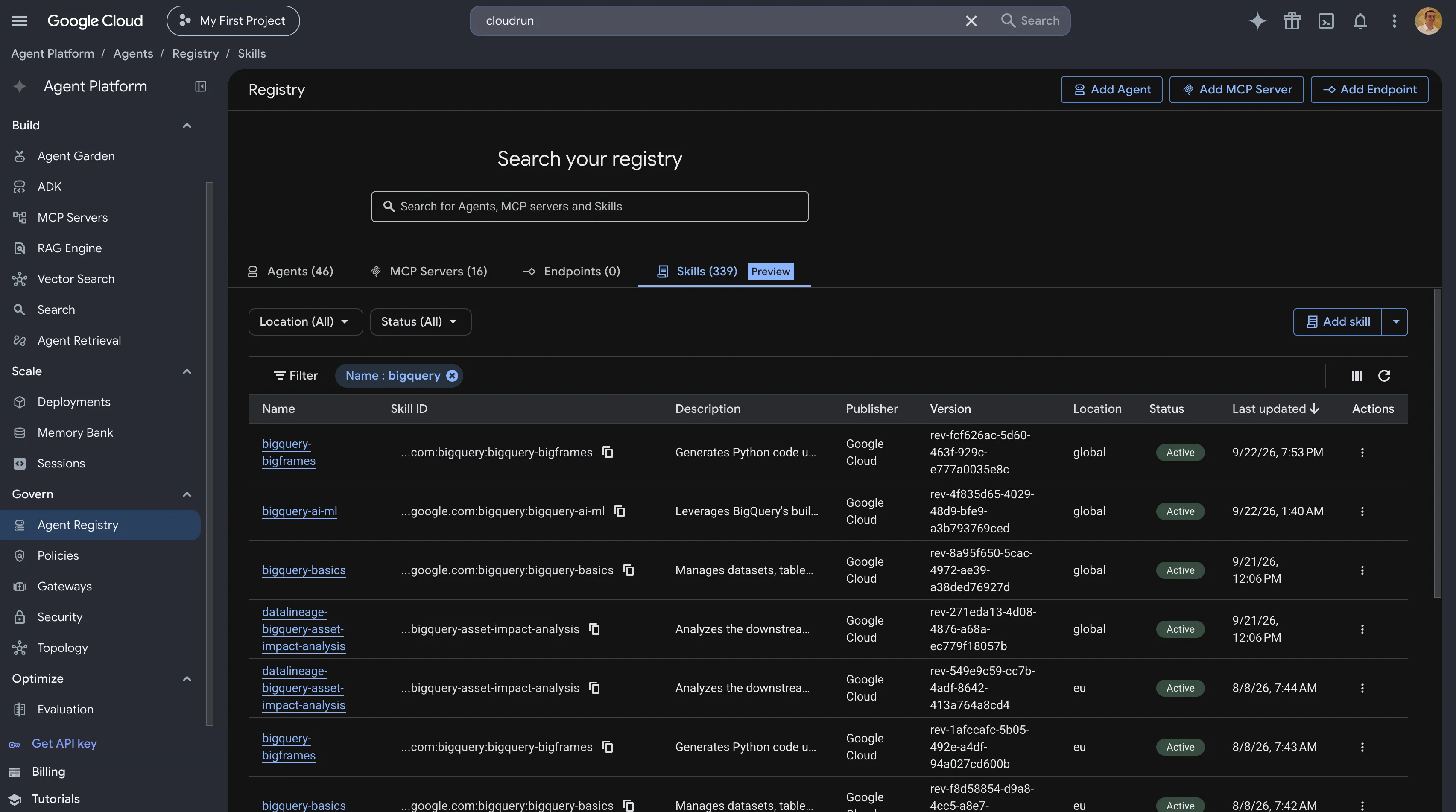
Many skills are available there, organized by region. Since I am building a BigQuery assistant, I can choose the bigquery-basics skill, so the agent gets Google managed helpers and instructions for querying BigQuery through MCP. ADK provides GCPSkillRegistry for this: with a project id and a skill location, it gives access to the whole skill registry, and I can later define which skills the agent should use.
Managed skill registry
All skills should be grouped in a SkillToolset, which lets the agent read and use them through its exposed functions:
SkillToolset
The example above shows the tool grouping both the custom skill and the Google Cloud skill registry.
The complete agent architecture can be summarized like this:
Agent instructions
An agent is an LLM chat assistant at its core. It cannot be programmed, but it can be instructed on what to do and how to do it. Instructions are crucial: best practice is to define the agent's purpose and theme, the best ways to perform actions, and which skills and MCP servers to use. Since instructions are written in natural language, the set of possible pre-instructions is practically infinite.
Agent instructions
In the example above you can see the definition of the agent's purpose, the MCP server to use, and the skills to follow. Note that the tools list mixes a custom function tool, the skill toolset, and the managed MCP server.
Local testing
Once the agent is developed, it can be tested locally before being pushed to GCP backends. The ADK CLI offers several test commands. It can run the agent in the terminal, expose its callable API locally for validation, or start a web version to chat with the agent and test its behavior:
adk run: runs the agent locally in the terminal.adk api_server: exposes the agent's HTTP API locally.adk web: starts a web UI on the agent for interactive testing.
To run an interactive chat on my local CLI I used the following commands:
Run the agent locally
I can also test a prompt directly by piping it to the interactive agent:
One-shot local test
GOOGLE_GENAI_USE_VERTEXAI must be set to true. Without it, the model client defaults to AI Studio and fails with an API key error. The code itself runs locally, but the model, the managed MCP tools, and the skills are all used remotely through the local user credentials, which are compatible with the identity the agent will use when hosted.
Deployment
ADK offers a wide range of functionalities that make agent design highly customizable, and deployment is just as customizable. At its core, ADK ships with a command that can provision the agent directly on the Agent Platform.
ADK agents can also be provisioned on Cloud Run. William Denniss at Google published a very interesting take on how to choose between the two backends, and it deserves a deep dive on its own: post.
The differences between the two methods are significant:
Agent Runtime (agent_runtime) | Cloud Run (cloud_run) | |
|---|---|---|
| Appears in Agent Platform > Deployments | ✅ yes | ❌ never |
| Managed sessions/history | ✅ automatic | ⚠️ in-memory by default, opt-in managed |
| Gemini Enterprise publishing | ✅ native, one command | ⚠️ A2A only, more setup, Preview |
| Infra ownership | ❌ Google-managed | ✅ self-managed |
The Cloud Run method gives full freedom over the agent ecosystem: sessions, RAG, long term memory, and everything around it. The Agent Platform runtime provides a managed agentic environment, with default session support and out of the box access to memory banks for long term memory.
In the next article I will explore the different deployment methods for this ADK agent using another tool called agents-cli, in a unified way across several targets.
Exploring ADK reminded me of the development cycle of containerized managed compute like Cloud Functions or AWS Lambda, but it ships with AI on top: managed tools, custom tools, and orchestration, all instructed together in natural language. The result is powerful agents for personal or enterprise usage.