Evaluating ADK Agents
Evaluating ADK Agents
In my previous article I built a BigQuery data assistant with Google ADK and tested it locally in the terminal. That agent is now on GitHub as agent-on-gcp. This article is the continuity: how I evaluated the agent's behavior before trusting it in production, what the evaluation runs discovered, and what I had to fix.
Developing an agent with ADK feels close to serverless container development. The tooling streamlines the work, and the code is testable with unit tests, even integration tests if needed. But those tests are not enough. A unit test answers perfectly when the path is deterministic. An agent is not: it uses LLM capabilities to decide what to do at every step. To respond to exactly this behavior, ADK ships with evaluation functionalities.
Testing the behavior of an agent matters before shipping it to prod. It scopes and predicts the outcomes of the agent, and that touches three architecture points directly: pricing budget, security, and semantic fidelity to the expected results.
LLM outputs are not deterministic and can hallucinate, and that impacts the agent's actions. Two runs of the same test and the same scenario can differ. So behavioral testing is not a one-shot activity. It runs in cycles and is measured on mean results. Calibrating the behavior means reaching the metrics I want, not respecting strict assertions. Errors are inevitable, so the real question is how many errors I am willing to tolerate, not how to remove all of them.
Evaluation
Even with a low temperature, my small bq_agent will make mistakes or bugs in responses, skill usage, and tool usage. Assertion-style tests would be intermittent by design. Instead, ADK evaluation works with criteria that carry tolerated error rates per case.
ADK offers a catalogue of criteria (see the official docs). For this agent I used the following:
Single-turn criteria:
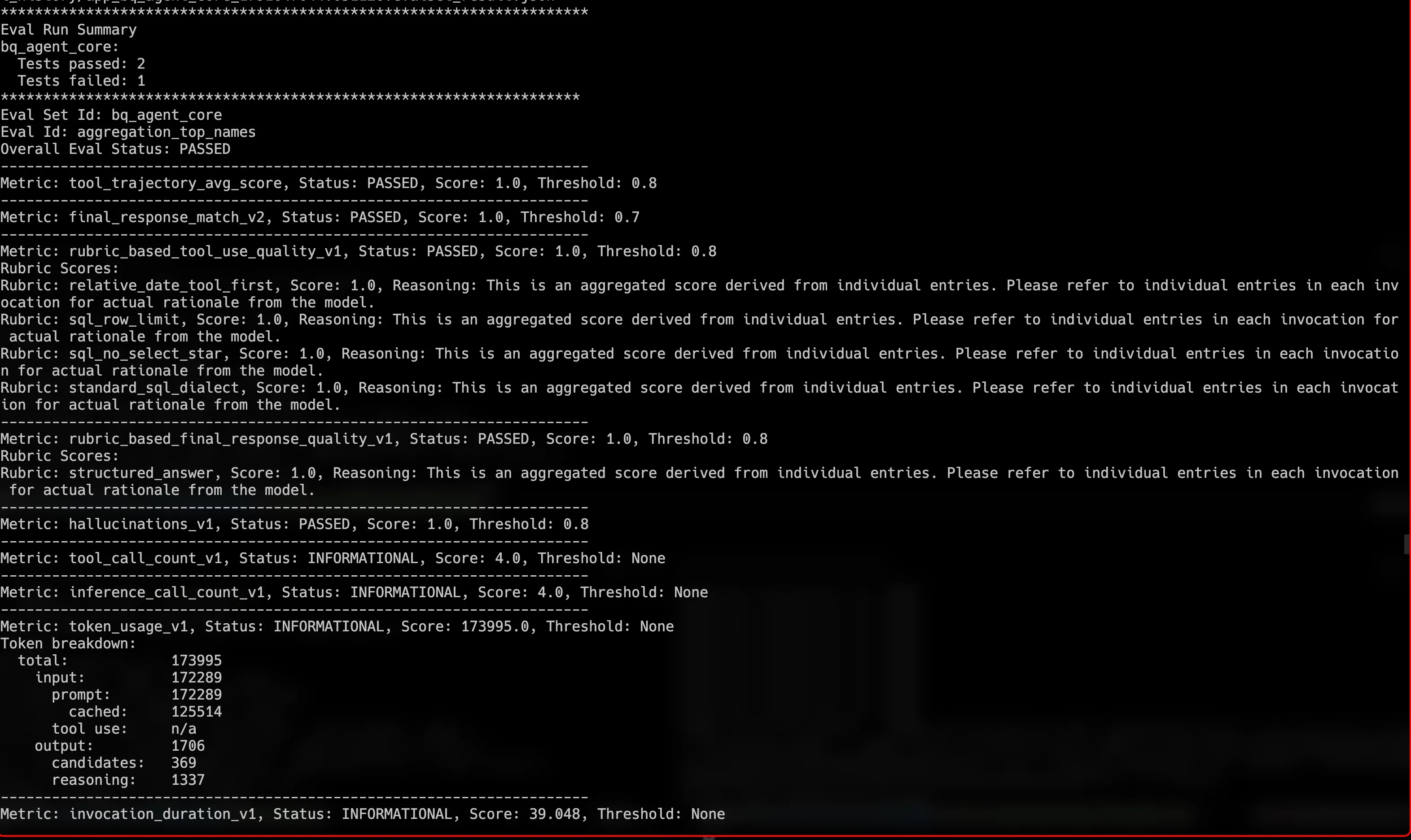
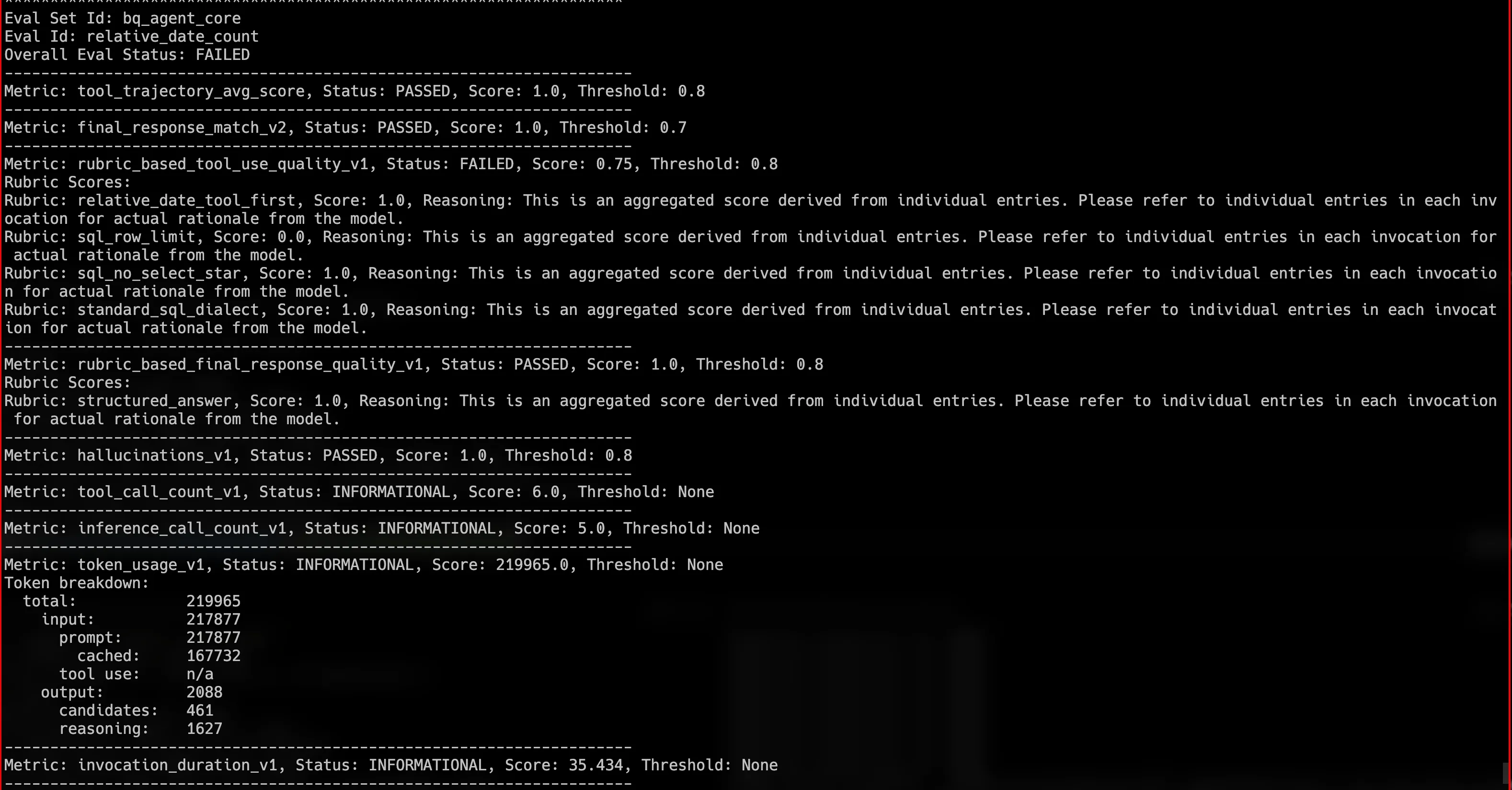
tool_trajectory_avg_score: compares the tools the agent called against the expected ones, in order (I use the IN_ORDER match type: expected calls must appear in order, extra calls in between are allowed; the stricter default is EXACT). Deterministic, no judge model involved.final_response_match_v2: a judge model scores how close the final answer is to a reference answer.rubric_based_tool_use_quality_v1: a judge checks written rules about tool usage, for example "every SELECT must include a LIMIT of at most 1000".rubric_based_final_response_quality_v1: same idea, but on the final response, for example "the answer must be valid JSON matching the output schema".hallucinations_v1: a judge splits the answer into sentences and checks each one against the actual tool outputs.
Multi-turn criterion:
rubric_based_multi_turn_trajectory_quality_v1: a judge grades a whole simulated conversation against rubrics, for example "the agent resolved follow-up questions from context without re-asking".
One honest limitation: the safety criterion and the dedicated multi-turn metrics stayed out of my runs. In ADK 2.10 they route through a Vertex evaluation facade that is incompatible with the current google-cloud-aiplatform 2.x SDK, so they can never produce a score on my toolchain. The details are documented in the repo's evaluation report.
On top of these, ADK always reports efficiency metrics for free on every run: tool_call_count_v1, inference_call_count_v1, token_usage_v1, and invocation_duration_v1. They never fail a run, they just inform. This is where the consumed tokens come from, and they turned out to be the most interesting input of this whole exercise.
So an agent can be tested on its path: did it use the expected artifact, a tool or a skill, and did it apply the required instructions? And it can be judged on its responses by an AI judge model, on single-turn and on multi-turn conversations.
Model usage is not free, and testing uses models twice: once for the agent, once for the judges. A good testing strategy is required, adapted to the use case and to the phase of the project. Tests also take time to finish. For this agent, path tests and single-turn tests are sufficient for frequent validation, with casual multi-turn executions when a big feature lands.
As a reminder, the agent from the last article uses one custom date tool (get_current_utc_date), the official Google Cloud managed MCP server for BigQuery, and a SkillToolset that groups a custom SQL guidelines skill and the managed bigquery-basics skill. It is an assistant that accesses BigQuery datasets and can request query executions. Since the last article it has also migrated from gemini-2.5-flash to gemini-3.8-flash, and the model id is now configurable through an environment variable. The evaluation targets exactly these behaviors: usage of these tools on path tests, and their behavior on single and multi-turn conversations.
For multi-turn, ADK offers scenarios and personas. A scenario describes a starting prompt and a conversation plan, and a user simulator (another LLM) plays the user following that plan. The persona is picked from a registry: NOVICE, EXPERT, or EVALUATOR. Here is one of my scenarios, where the user asks a follow-up question that only makes sense with context:
Multi-turn scenario
The full files are on the repo: scenario evalset, single-turn evalset, and the criteria configuration. A second, longer scenario where a novice user reveals parameters one at a time is kept for manual runs.
Executions and discoveries
ADK runs the evaluation locally: the code executes on my machine, the agent calls the real Gemini models on Vertex AI, and judge criteria call a judge model. To play with the tests on my repo, the setup needs local GCP credentials, the synced dependencies, and three environment variables:
Setup
The runs are driven by pytest, gated behind an environment variable so normal test runs stay offline and free:
Run the eval tiers
The same runs exist on the ADK CLI directly, which is also how the longer manual scenario suite is executed:
ADK CLI equivalents
Every run archives its detailed scores as a timestamped file under tests/evals/baselines/, so runs can be compared over time.
example of a successful metric evaluation (the same run had one failed case, shown next):
example of a failed metric evaluation:
The harness itself is a thin wrapper around AgentEvaluator.evaluate, visible in tests/test_eval.py. This is how ADK executes an evaluation, with and without a judge:
Calibration
On the first iteration my metrics were too strict. I had set thresholds at 1.0 on judge-scored criteria, and judge models have variance: one flagged sentence out of three drops a score to 0.67, one unmet rubric out of four gives 0.75. I loosened hallucinations_v1 and rubric_based_tool_use_quality_v1 from 1.0 to 0.8, and kept the deterministic trajectory criterion as the hard gate.
I also changed the judge model. Criteria without an explicit judge fall back to the ADK default, gemini-2.5-flash (itself end of life in October 2026), so a previous-generation model was judging my Gemini 3 agent. I pinned all judges to gemini-3.5-flash, deliberately different from the agent model (gemini-3.8-flash) to avoid self-preference. Then, two days before this article was published, gemini-3.5-flash was deprecated and its requests started auto-routing to gemini-3.6-flash, so the pin is now gemini-3.6-flash. Ironic timing, and it reinforces the point: a judge pin is only deliberate if it is revisited when models move.
One more honest discovery: the reference answers in my evalset had to be validated against the real dataset. My first draft quoted a number that was simply wrong (19,120 instead of 2,589). The rule now is: query the dataset first, then write the reference, and if they disagree, fix the reference, not the agent.
The bug the evaluation found
The runs also identified a real bug. The agent's response window (max_output_tokens) was too small. Gemini 3 is a thinking model, and thinking tokens consume the same output budget as the visible answer. About 1 invocation out of 30 ended with the budget eaten by thinking, and the final answer came out as truncated, invalid JSON. I doubled the budget from 1024 to 2048 tokens and the truncation disappeared. This defect would have shipped silently without behavioral evaluation.
The cost lesson: tools are hidden tokens
The first iterations were long, especially multi-turn. In one early run I pushed the framework too hard. What actually happened: the ADK user simulator stops on its own only when it judges the conversation plan satisfied, with a generous default budget of 20 invocations per conversation (max_allowed_invocations), and I had not lowered it. The simulated chat kept going for over an hour on a small agent, and the bill for the whole exercise climbed past a hundred dollars. That humbled me. Evaluation design is mandatory work, not an afterthought, exactly because of the budgeting and security scope I cited at the start.
It also pointed me to a best practice I failed to respect on the first iteration of my agent. Security-wise the agent was well scoped in its actions. But on tool loading, I did not filter the tools to only the ones actually used. The user prompt is not the only thing that consumes tokens: the tool and skill definitions are a hidden burden the agent downloads on every model call, and over runs that generates steady token usage and slowness.
The numbers were clear once measured. The managed BigQuery MCP server exposes 9 tools, and their declarations weigh about 157K tokens in total. Three job-management tools account for most of it: cancel_job, get_job, and get_query_results, with the first two alone carrying 118K, around 75%. My agent is a read-only assistant that never manages jobs. I filtered the toolset to the 6 query and metadata tools it actually uses:
MCP tool allowlist
execute_sql stays in the list for what the read-only tool rejects by design (non-SELECT statements such as BigQuery ML or scripting); in practice, every traced run used execute_sql_readonly.
The gain: the schema footprint dropped by 77%, and the prompt per model call went from about 165K tokens to about 44K, so 73% cheaper on every call, in tests and in production. The change is in bq_mcp_client.py.
I also added context caching. ADK supports it at the App level: the stable prefix of the prompt (instructions plus tool schemas) is cached and reused, and cached reads are billed at a discount on Vertex AI. While measuring, I found that Vertex implicit caching was already serving about 39K of the 44K prompt tokens from cache on the later calls of a session. The explicit configuration keeps that behavior controlled:
App with context caching
Both fixes are in agent.py and the adapter file linked above.
Best practices I keep from this
I took the time to scan current sources for better practices, and this is my base for designing future agents:
- Scope tools per agent. Google recommends keeping around 10 to 20 active functions per request. Filter managed MCP servers by default.
- Treat tool schemas as infrastructure, not as prompt content. Cache the stable prefix and keep it stable.
- Match the thinking level to the task. Simple SQL assistance does not need the deepest reasoning budget.
- Measure the token anatomy of one invocation from day one: prompt, output, thinking, cached reads.
- Design evals in tiers. Deterministic criteria are cheap, LLM judges multiply the cost, and user simulators are the most expensive.
- Keep judge usage deliberate: sample counts, judge model choice, and run counts are budget decisions.
The test tiers
If I had not evaluated the agent's usage, I would not have found or addressed any of the points above. For such a simple agent, that underlines how much evaluation matters on production environments. Evaluation should also not be executed randomly. It should be efficient in what to test and when to test it. After rechecking the scenarios, I landed on three tiers:
- Smoke (path tests): tests the usage of skills and tools with the deterministic trajectory criterion. No judge, near-zero cost beyond the agent calls. Runs per PR.
- Gate (single-turn): the full criteria set with judges, one run per case. Tests the outcomes of the agent. Runs nightly or before a release.
- Full (multi-turn): the simulated conversations, three runs per scenario. Long chat sequences, the most expensive tier. Runs on feature integration or similar ceremonies.
| Tier | Command env | Content | Cost | When |
|---|---|---|---|---|
| Smoke | RUN_ADK_EVAL=smoke | 2 cases, trajectory only | cents | per PR |
| Gate | RUN_ADK_EVAL=gate | full single-turn suite, 1 run per case | ~$1 | nightly / pre-release |
| Full | RUN_ADK_EVAL=full | multi-turn scenarios, 3 runs | a few dollars | milestones |
Results
After calibration and fixes, the best runs look like this. One caveat first: the suite is intentionally small, 3 single-turn cases and 1 multi-turn scenario. These are smoke-level results to build on, not full coverage proof.
- Single-turn gate: all criteria at 1.0 across all invocations, 100% pass on trajectory, response match, rubrics, and grounding. Mean of 5.3 tool calls and about 62 seconds per invocation.
- Multi-turn full tier: rubric scores of 1.0, 0.8, and 1.0 across the three runs, a 0.93 mean against a 0.8 threshold. The second turn of the conversation used exactly one tool call, the filtered SQL query, which is the context carryover behavior I wanted to see.
- Cost after the optimization round: a full multi-turn run uses about 1.5M agent-side tokens and costs an estimated 2 to 3 dollars. The same run before the tool filtering would have cost 15 to 25 dollars.
Every run archives its detailed scores on the repo under tests/evals/baselines, and the full analysis with failure history lives in the evaluation report.
Conclusion
An agent must be strictly designed with usage in mind, and planned for cheap and safe execution on production environments. Evaluation is a must to detect leftover pain points before they become errors or incidents. Testing should be cyclic, and the number of runs should grow with the complexity of the agent's execution, for example when sub-agents enter the picture. It should be based on criteria and metrics that give an image of the sanity and the expected error rates of the agent, feeding a continuous development cycle toward optimizing and reducing these side effects.