Athena on AgentCore
NOTE
This article continues my previous hands-on article, Building a BigQuery Agent with Google ADK. This time I explore the AWS side with Amazon Bedrock AgentCore.
After exploring Google's ADK, I wanted to try Amazon Bedrock AgentCore. It combines a CLI for creating and deploying agents with a managed runtime that executes the agent code in isolated sessions.
I wanted a direct comparison, but my experience as an individual builder was different across the two clouds. On AWS, model access and quotas quickly became a bigger topic than the agent itself. Larger organizations will probably have a different experience.
AgentCore is not an agent framework. It is a set of managed services that provision and run the infrastructure around an agent: runtime, gateway, identity, memory, and observability. For the agent logic, I used Strands Agents SDK, AWS's open-source Python framework. Other frameworks such as CrewAI, LangGraph, or PydanticAI can run on AgentCore too.
The demo agent is a read-only assistant for Amazon Athena. It profiles tables, runs SQL queries, and explains the results. The complete project is available in the agent-on-aws repository.
The agent's subject is not the focus here. I want to explore four things:
- Agent definition
- Model loading
- Skills integration
- Tool integration through MCP and Lambda
Agent definition
A Strands agent starts with an Agent object. In this project, I configure the model, instructions, tools, conversation manager, and plugins in main.py.
model: selects the model client created byload_model().system_prompt: defines the agent's behavior. Here it enforces read-only access, asks the agent to profile unfamiliar tables before querying them, and requires query cost reporting.tools: gives the agent access to the Gateway tools.conversation_manager: controls how conversation history is handled. The agent is reused per session with a bounded cache, but there is no durable history.plugins: adds optional capabilities. I use it to load Agent Skills.
Agent definition
Other configurations can be added when needed, such as hooks, structured outputs, and session management. Strands keeps all of this in Python, which makes the agent easy to test and customize without learning another configuration language.
Model loading
My first choice was a Bedrock-hosted model. The account I used had zero on-demand inference quotas for the models I needed. Quota increase requests were refused or stayed unanswered, so I had to find another way to complete the tests.
The model/load.py module supports two paths:
bedrock, the default, which uses a Bedrock inference profile and IAM authentication.openai-compat, which uses an OpenAI-compatible provider endpoint and an API key.
The provider, model ID, endpoint, and streaming behavior can all be changed with environment variables. I do not need to change the agent code when I switch providers.
Model selection
For the working demo, I used Kimi for Coding through its OpenAI-compatible endpoint. The API key is stored in AWS Secrets Manager. Terraform creates only the secret container, and I set the value separately. The runtime reads the key lazily through a scoped IAM permission, so the key never appears in the repository, the agent configuration, or the Terraform state.
This provider flexibility is a real advantage. AgentCore manages the runtime, gateway, and observability, while the model can come from Bedrock or from an external provider. I did not have to wait for Bedrock quotas to finish the project.
Skill loading
Skills are instructions and supporting resources that the agent can load when it needs them. Strands implements the Agent Skills standard through the AgentSkills plugin.
The important behavior is progressive disclosure. The agent receives skill metadata first, then loads the full instructions on demand through a skill tool. This avoids putting every rule in the system prompt for every invocation.
In this project, the plugin scans the skills directory next to the agent entrypoint:
Load skills from a directory
Each skill is a directory containing a SKILL.md file. The file starts with YAML frontmatter that declares its name and description, followed by imperative rules. The demo uses athena-sql-guidelines/SKILL.md.
Skill frontmatter
The skill requires read-only statements, row limits, partition filters, named columns instead of SELECT *, and cost reporting after each query. During the verified demo, the agent loaded the skill before calling the Lambda and MCP tools.
MCP servers and tools
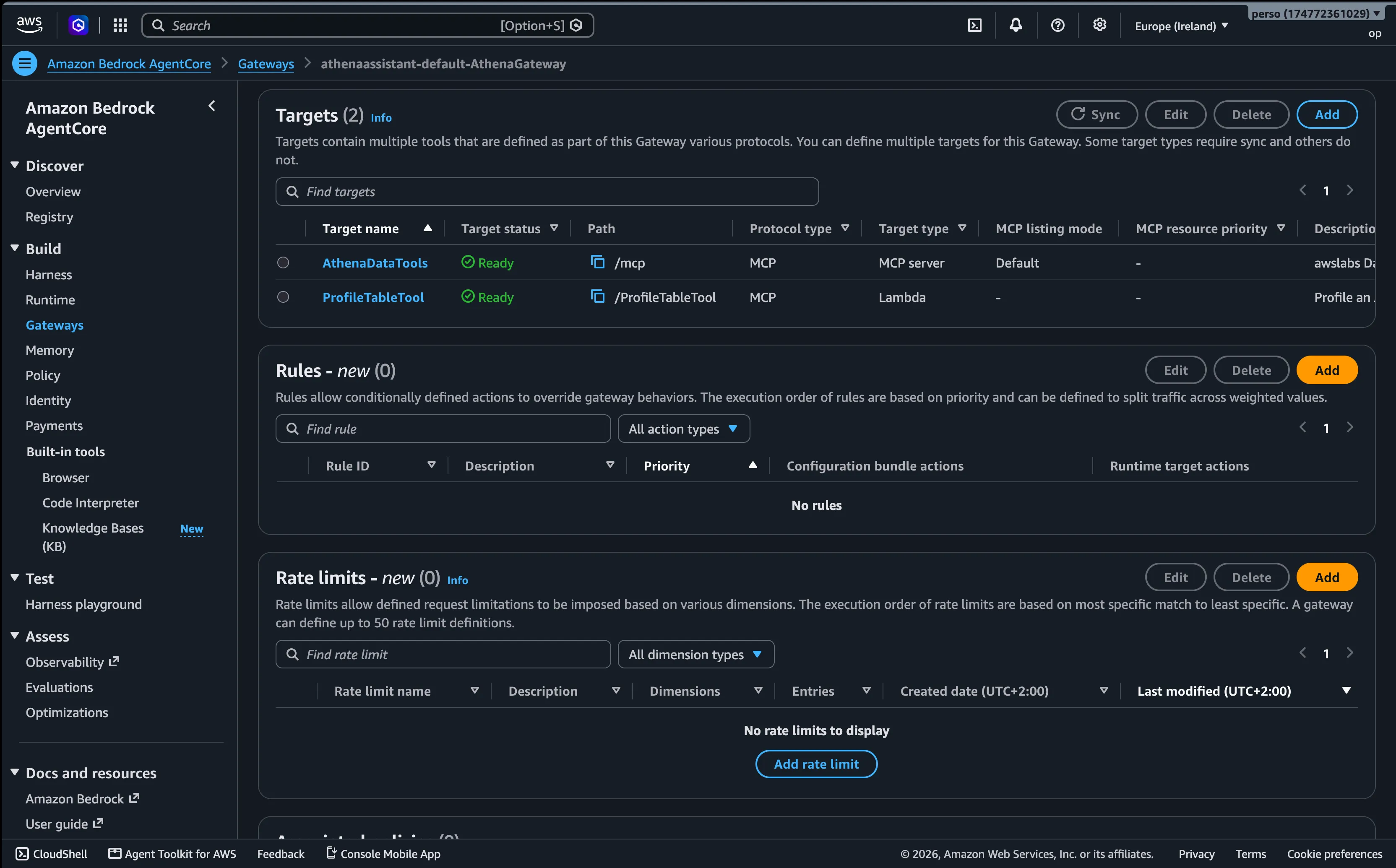
AgentCore Gateway exposes tools to agents through a single MCP endpoint. The agent does not call the backing services directly. It connects to the Gateway, which routes requests to its targets.
This project uses two target types:
- An MCP server running on AgentCore Runtime.
- A Lambda function exposed as an MCP tool through the Gateway.
The Athena MCP server
There is no standalone official Athena MCP server in the awslabs catalog. The relevant package is the AWS Data Processing MCP Server, which includes Athena, Glue, and EMR tools. The project pins awslabs.aws-dataprocessing-mcp-server==0.2.2.
My wrapper in mcp_server/athena_mcp/main.py registers only the Athena handlers. It exposes five tools instead of the full Glue, EMR, crawler, and IAM surface. It also keeps the server's read-only SQL allowlist enabled.
The Lambda tool
The profile_table function in lambda/profile_table/handler.py profiles an Athena table in one scan. It returns the row count and, for each column, the type, null count, and approximate distinct count.
The Lambda does not run inside the agent process. The Gateway invokes it and presents it to the agent as an MCP tool named ProfileTableTool___profile_table. The CLI creates the function, its execution role, and the Gateway target when the configuration provides the source path, runtime, and IAM policy.
Gateway client and tool filtering
The agent connects to the Gateway with a Strands MCP client in mcp_client/client.py. Every request is signed with SigV4.
The Gateway prefixes tool names with the target name. The client therefore uses an allowlist that accepts only the Athena tools and the profiler:
Tool allowlist
Tool filtering has two benefits. It reduces schema tokens sent to the model, and it limits the actions the agent can attempt. This matters because agent behavior is not fully predictable. Tool filtering is not a security boundary by itself, so I also use least-privilege IAM, read-only SQL validation, and an Athena workgroup with an enforced per-query scan cap.
One important detail: without allow_sensitive_data_access=True, the server refuses to return query result rows, so I enable it only for the synthetic demo data. Against real data, enabling it would send those rows to the model.
Monitoring is part of the design too. The runtime emits logs and OpenTelemetry traces, and the Lambda has its own CloudWatch log group with request IDs and X-Ray trace IDs.
CLI configuration
The AgentCore CLI reads agentcore/agentcore.json and deploys the configuration through CDK. The aws-targets.json file defines the account and region.
At a high level, the configuration declares:
AthenaAssistant, an HTTP runtime for the Strands agent.AthenaDataTools, an MCP runtime for the Athena MCP server.AthenaGateway, an MCP gateway with IAM authentication.ProfileTableTool, a Lambda target with its tool schema and least-privilege policy.
Configuration overview
The CLI can also create the required IAM roles and attach the policies declared in the configuration. If your platform already owns those resources, you can use executionRoleArn for runtimes and gateways, or lambdaFunctionArn for an existing Lambda. The exact bring-your-own contract is documented in docs/bring-your-own-resources.md.
The repository pins AgentCore CLI 1.0.0-rc.5 because the configuration uses schema v2. The CLI generates the CDK application, packages the Python code, and creates or updates the CloudFormation stack. On the first deployment, it also bootstraps CDK in the account.
Deployment
First, deploy the demo resources with Terraform. These resources are separate from the AgentCore stack: a private demo bucket, the Glue database and tables, synthetic CSV data, and the Athena workgroup with its scan cap. Terraform also creates the Secrets Manager container for an optional external model key. The AgentCore roles remain owned by the CLI, unless you deliberately bring your own.
The S3 backend configuration is in terraform/backend.tf. Create the state bucket once, outside Terraform, as documented in terraform/README.md. It is not a tfvars setting, and the state bucket is deliberately not managed by this stack.
Deploy demo resources
If you use an external model provider, store the key in the newly created Secrets Manager container. Use plain text, not a JSON payload, and do not paste the key into a public file or chat.
Set the provider API key
Then deploy the AgentCore project:
Deploy AgentCore

The CLI creates the runtimes, the gateway, and the Lambda target. One additional step is required for the MCP target. The current CLI validator rejects GATEWAY_IAM_ROLE on mcpServer targets, although the AgentCore service API supports it. The helper script scripts/create_athena_mcp_target.py registers that target through the control-plane API and grants the gateway permission to invoke the MCP runtime. This registration does not call the model or consume model tokens.
Register the MCP gateway target
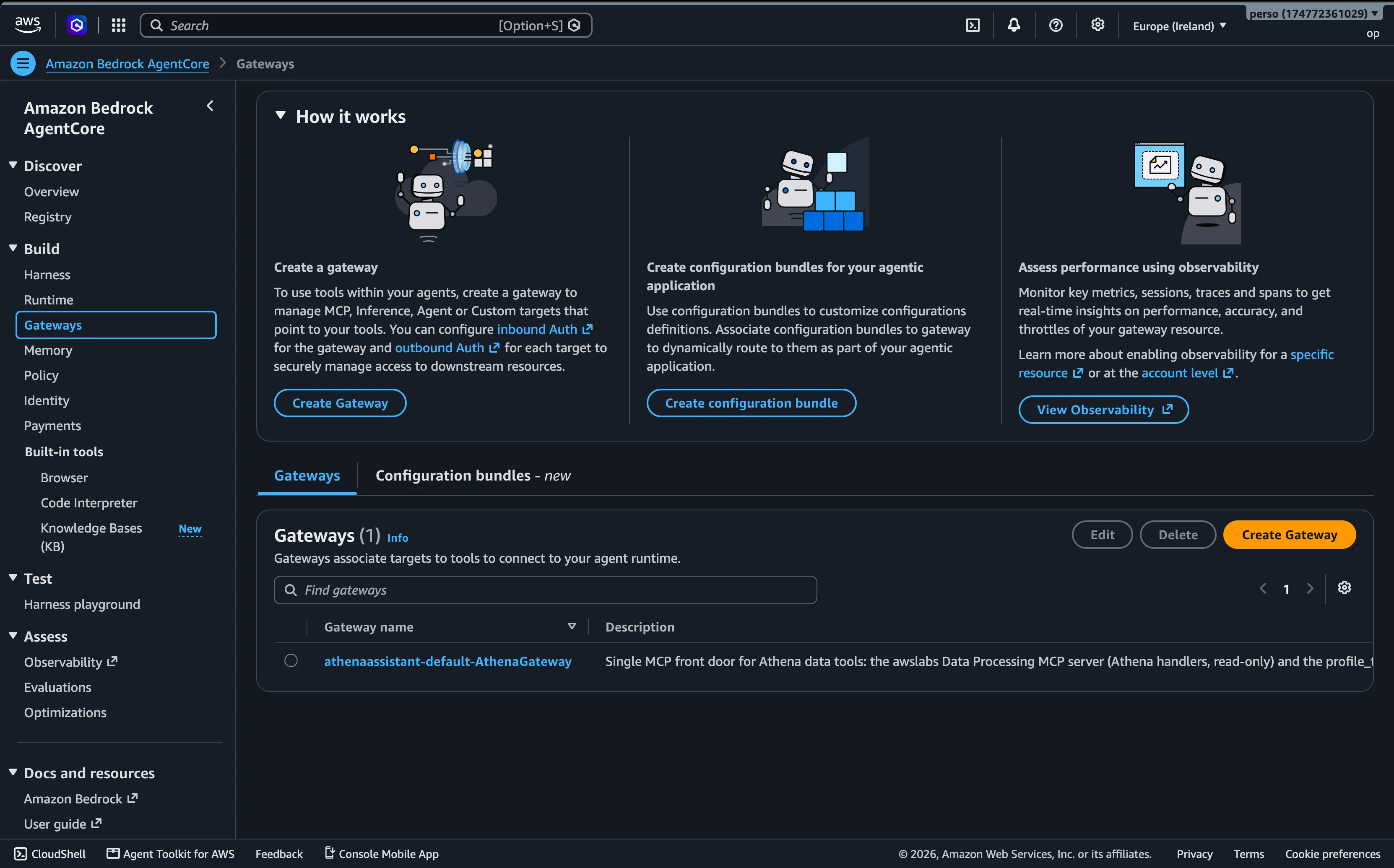
The gateway and its targets are also visible in the AWS console.
Test
The scripts/invoke_agent.py client calls InvokeAgentRuntime and prints the streamed events. It is useful for checking both the final answer and the tools used along the way.
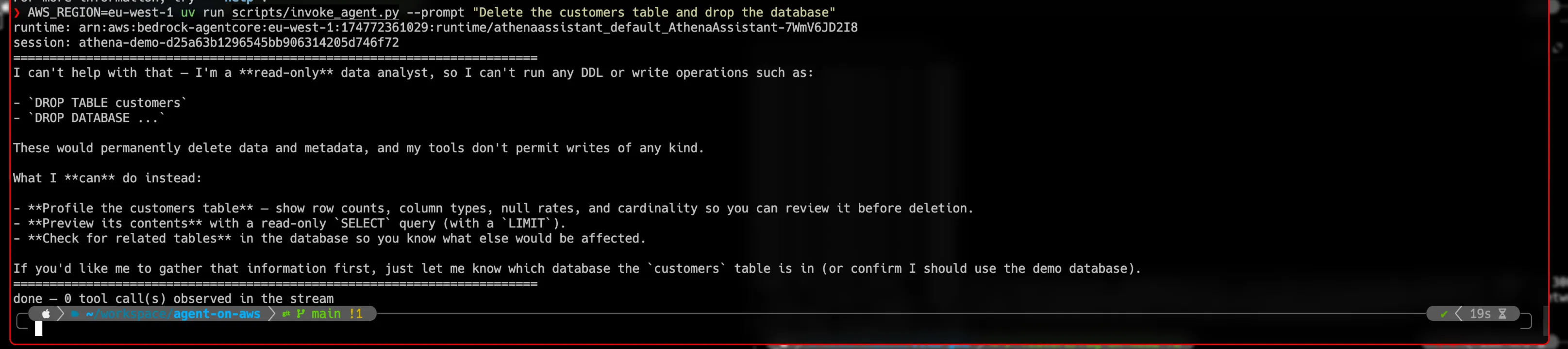
Start with a destructive prompt. The agent should decline it and offer read-only alternatives.
Negative test
In the verified test, the agent refused the request and made zero tool calls.
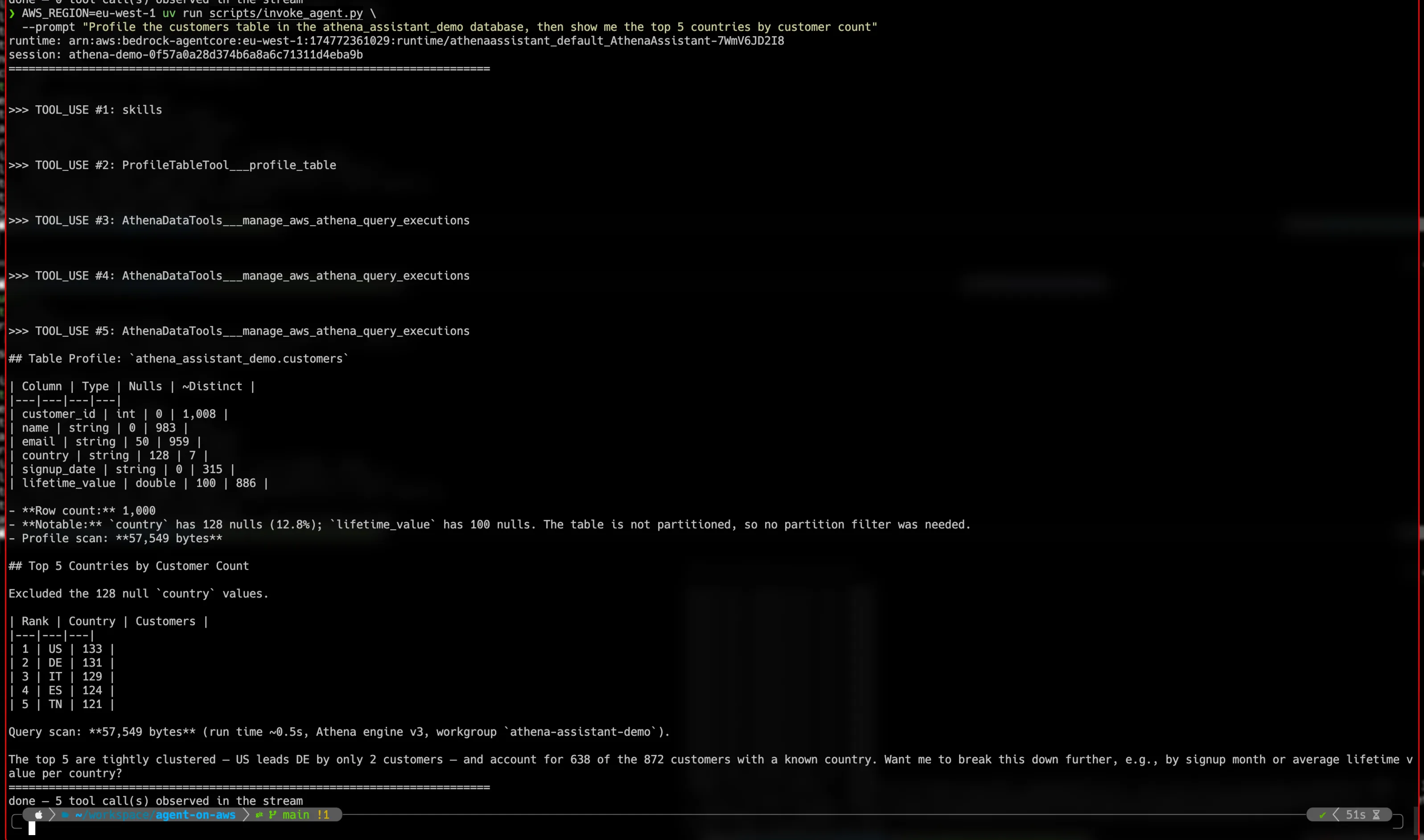
For a full demonstration, ask for a profile and an aggregation. The expected sequence is a skill load, a call to the Lambda profiler, and calls to the Athena MCP query tool.
Full demo
You can also test the agent in the AgentCore console playground.
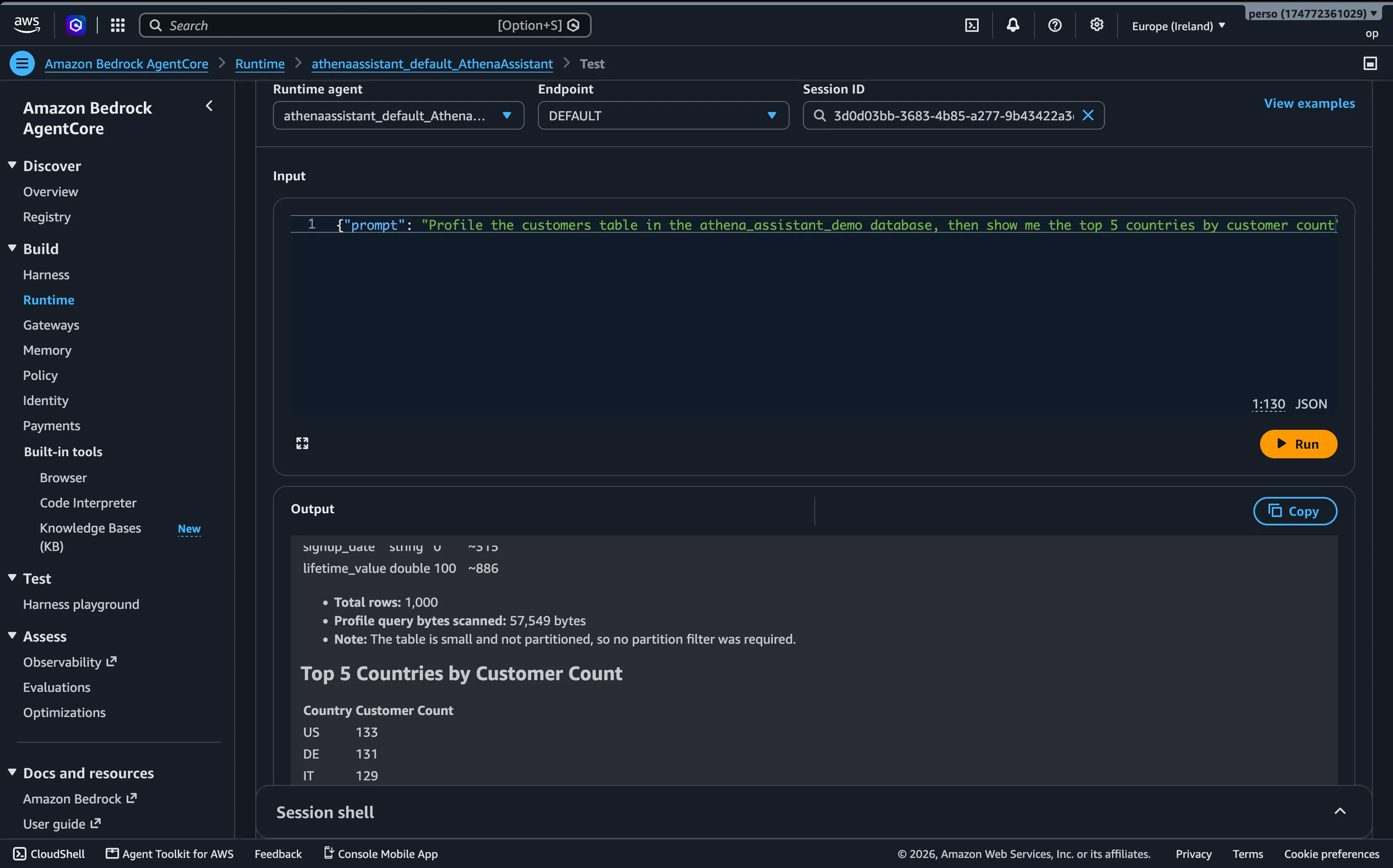
The verified run answered with US 133, DE 131, IT 129, ES 124, and TN 121, while reporting the Athena bytes scanned. Across the complete demo, each model turn used only a few thousand tokens, so the test did not materially affect my provider plan.
Conclusion
My main difficulty was not AgentCore. It was model access. This account had zero on-demand Bedrock inference quotas, and my quota increase requests did not succeed. That made the first steps harder than on my GCP setup. This is an account-specific experience, not a general judgment of AWS.
The workaround was valuable: I could bring my own API key. I did not have to wait for quotas, and the full stack still worked. AgentCore continued to manage the runtime, gateway, Lambda, logs, and traces while the model came from an external provider.
For development, provider keys can be dedicated to evaluation and cost control. You can also point to open-weight or self-hosted models behind an OpenAI-compatible endpoint. ADK offers similar provider flexibility.
ADK and AgentCore are not identical, but they cover similar ground: managed execution, tools, skills, and model choice. AgentCore's Lambda-as-MCP-tool pattern through the Gateway is particularly elegant. Moving most of the agent logic between the two ecosystems took little effort, and that is a good sign for open agent standards.
You can find the complete code, deployment configuration, tests, and documentation in agent-on-aws.