Multi-Tier LLM Routing on GKE
Note: This article is a continuation of my previous post on scaling vLLM to zero. The full codebase for this multi-tier setup is available on GitHub: iheb24/vllm-gke.
In one of my latest articles, I have added a KEDA scaler to my GKE stack. This setup automatically scales the GPU node down to zero during idle periods and brings it back up whenever a request arrives from curl or a code assistant like Cline. Recently, I started exploring AI gateways, specifically how they can serve multiple models behind a single endpoint and how some feature an 'Auto' mode that dynamically selects the right model for you. In this article, I will demonstrate how to build a multi-model tiering system on top of my KEDA stack using straightforward models and concepts.
Why one model is not enough
Waking the GPU from zero takes several minutes. Although a PersistentVolumeClaim caches the Hugging Face model weights on disk to make subsequent startups faster (around 3 minutes compared to 7.5 minutes on the initial boot), this latency is still far from ideal. Note that the PVC stores the model weights cache, not the container image.
Waiting three minutes for an answer to a quick conversational question results in a poor user experience. Furthermore, it leads to significant over-provisioning: spinning up a 14B parameter model on a dedicated GPU just for small talk is an inefficient use of resources. Because resource efficiency is critical, I decided to introduce a two-tiered architecture to the stack.
The two models
The stack now runs two distinct models side by side:
qwen3-4b-cpu: A 4-billion parameter Qwen 3 model running on CPU viallama.cpp. This model is always on, lightweight, and cost-effective, making it perfectly suited for handling conversational traffic with fast, sub-30-second responses.Qwen/Qwen2.5-Coder-14B-Instruct-AWQ: The 14B coding model discussed in my previous articles, served by vLLM on the GPU. This tier continues to scale to zero when idle.
Before diving into the routing logic, it's worth mentioning that in a multi-tier setup, maintaining a unified authentication flow is highly recommended. For the sake of simplicity in this article, both servers enforce the same API key using their native mechanisms (VLLM_API_KEY for vLLM and LLAMA_API_KEY for llama.cpp), with both pulling from the same Kubernetes secret.
The components
Three core components work together to determine the destination of each request:
- Envoy AI Gateway: Acting as the new entry point of the stack, every incoming call arrives here first. Envoy can either route requests directly based on the model name or defer to an external router's decision.
- The Small CPU Model: Powered by
llama.cppserving Qwen 3 4B, this component is dedicated to handling conversational workloads. - vLLM Semantic Router: A classifier that analyzes the prompt and determines the most appropriate model to serve the response. Powered by a ModernBERT topic classifier, it infers the domain of the prompt (e.g., computer science) and provides a routing decision back to Envoy.
Two use cases
Coding Agent Companion: My IDE assistant, Cline, connects to the stack and pins its requests directly to the GPU model, exactly as configured in my previous articles. Pinning a specific model name bypasses the classification process entirely, allowing the router to forward the request straight to the GPU tier.
Chat UI: A lightweight frontend interacts with the stack using three available modes:
qwen3-4b-cpu: The always-on, lightweight model reserved for everyday conversational topics.Qwen/Qwen2.5-Coder-14B-Instruct-AWQ: The heavy-duty coding model running on the GPU.auto: In this mode, the prompt is evaluated by the classifier, allowing the router to dynamically select the most suitable target model.
Scale to zero still works
The KEDA scaling strategy introduced previously remains completely unchanged. The only difference lies in the request path. Instead of being intercepted directly by the KEDA HTTP add-on, requests now hit the Envoy AI Gateway first. The gateway only forwards the traffic to the KEDA interceptor under two conditions:
- The request explicitly targets the GPU model.
- The semantic router classifies the prompt under computer science or another similarly complex domain.
From that point on, the lifecycle remains identical:
- If the GPU is suspended, the interceptor holds the request and instructs the scaler to wake the node.
- If the GPU is already active, the request is forwarded immediately.
After 300 seconds of inactivity, the GPU scales back down to zero. The only persistent infrastructure costs are the small CPU model and the system node that hosts the gateway and the router.
The fallback model is a strategy choice
The default model is triggered whenever no decision rules match the prompt. You should treat this as a fallback mechanism and select it based on what you prioritize most.
If you assign the lightweight CPU model as your fallback, misrouted complex prompts will result in weak or superficial answers, sacrificing response quality. Conversely, if you rely on the heavy GPU model, ambiguous prompts might trigger unnecessary hardware wakes, leading to higher costs.
For this specific stack, I have designated the GPU model as the fallback. A false positive that wakes the GPU only costs a few cents and a brief delay, whereas a complex prompt poorly answered by a smaller model can generate misleading output that looks deceptively correct. I call this escalation bias, and every decision rule can be fine-tuned independently to adjust this balance.
Routing configuration
The routing logic is defined declaratively in the semantic router's configuration. This file dictates which domains each model is responsible for, as well as a default fallback model when no specific rules apply. I have set up three primary profiles:
code_agentic: Reserved for agentic coding tasks, similar to the traffic generated by Cline.technical_complex: Dedicated to challenging STEM subjects outside the realm of standard computer science.chat_casual: Used for everyday conversations and general knowledge, served entirely by the CPU tier.
The complete routing configuration is available in the iheb24/vllm-gke repository.
Semantic router decisions
Signals are crucial as they help steer the classifier's decisions. The keyword list defined above acts as a safety net, catching code-specific terminology even when the topic classifier hallucinates or selects the wrong domain. For instance, I encountered a scenario where a prompt discussing database migrations was mistakenly categorized under 'business' due to the inclusion of the word 'billing'. Fortunately, the predefined keywords caught the context and successfully redirected the prompt back to the GPU tier.
Classification is a continuous tuning job
While topic-based classification is exceptionally fast and simple, it only evaluates the general theme of a prompt. This inevitably leads to false positives, like a basic 'hello world' script needlessly waking the GPU. The frequency of these misclassifications depends heavily on your traffic patterns and configuration tuning.
In a true production environment, relying solely on this classifier wouldn't be sufficient. You would want to incorporate internal telemetry regarding your specific workloads and utilize more advanced classifiers capable of analyzing the deeper semantic intent of the prompts. Regardless of the complexity, the operational lifecycle remains the same: monitor the router's decisions, identify recurring patterns in your prompts, and iteratively refine your rules based on real-world usage.
The demo UI
All three routing modes are accessible through a minimal dedicated UI, and the behavior aligns perfectly with our configuration.
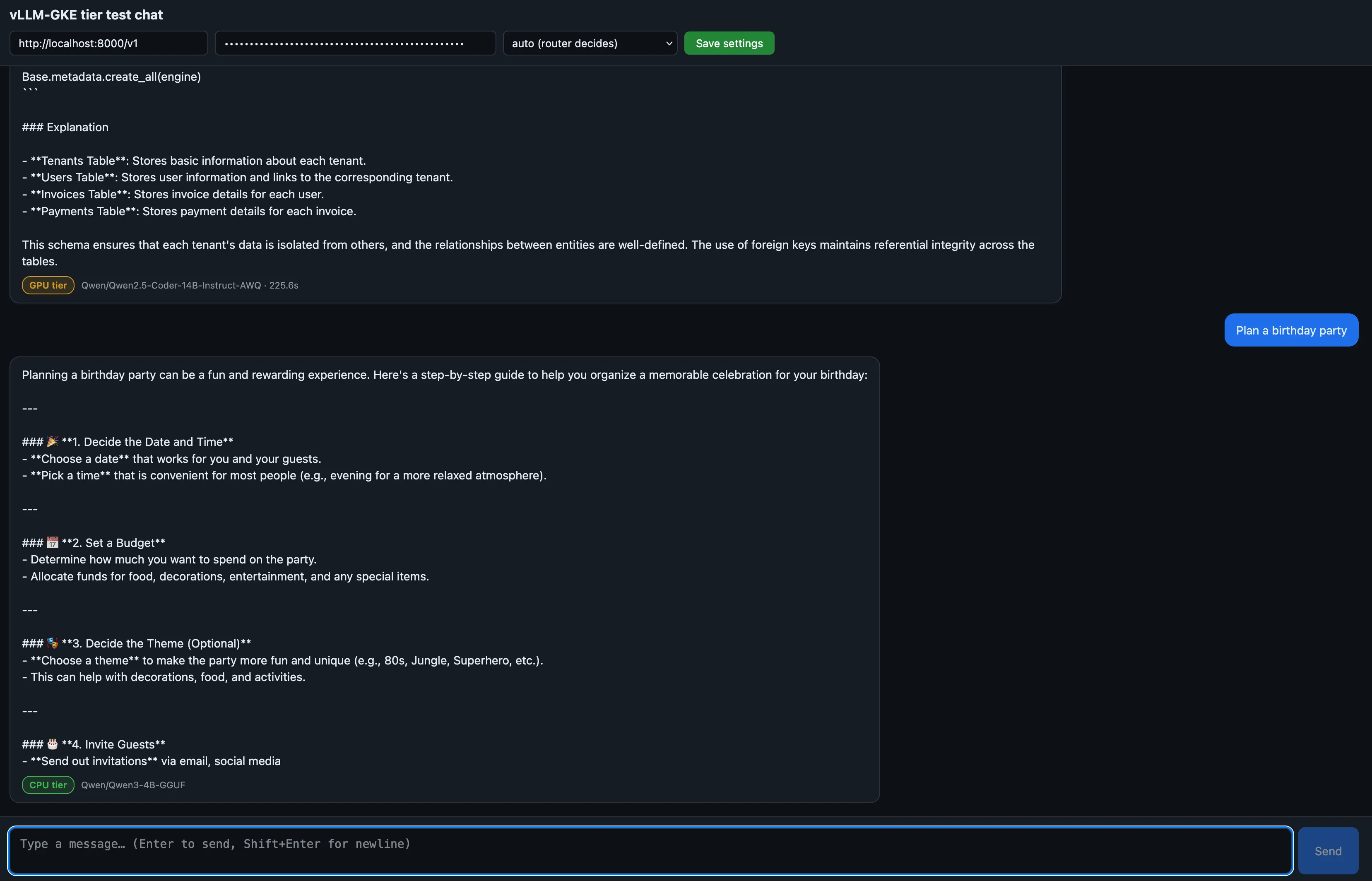
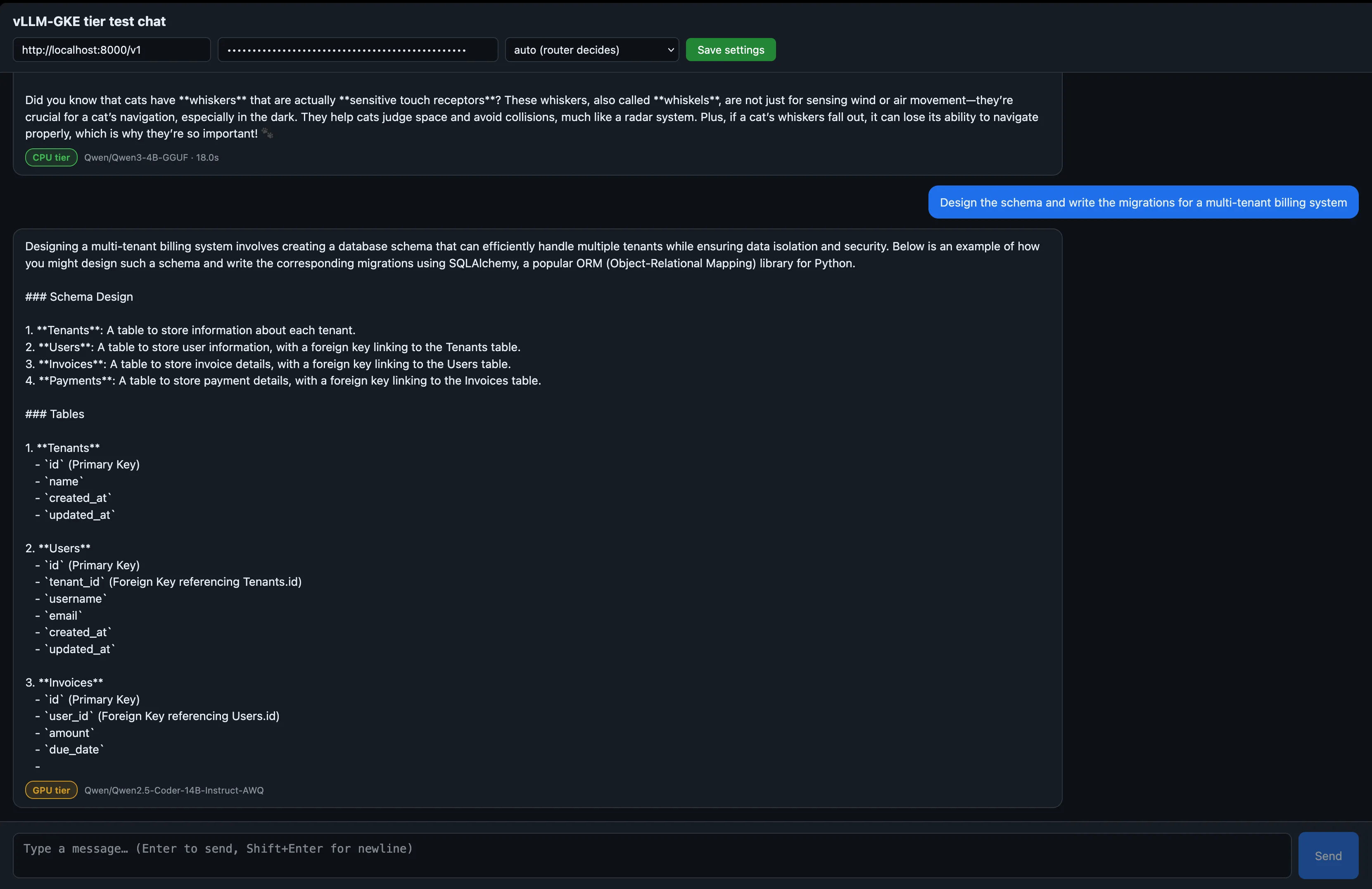
When pinning specific models, they operate exactly as intended: the 4B model provides rapid responses for simple queries, while the 14B model incurs a cold-start delay on its first invocation before eventually scaling back down after a 300-second idle period. However, the true highlight is the auto mode. Because the classifier evaluates every single message independently, a single chat session can fluidly alternate between responses generated by both the CPU and GPU tiers. It is worth noting that this creates a session-affinity challenge: alternating between two distinct models means they must both correctly parse and process the shared conversation history without context fragmentation.
Knowing which model answered
The UI is capable of displaying exactly which tier processed a request because the stack transparently reports its routing decisions in the response. This information is available from two distinct sources.
First, the semantic router injects specific metadata into the response headers:
x-vsr-selected-model: The model that was selected, for exampleqwen3-4b-cpu.x-vsr-selected-decision: The rule that fired, for examplechat_casual.x-vsr-selected-confidence: The classifier confidence score.x-vsr-routing-latency-ms: How long classification took, usually under a millisecond for pinned models and around 100 ms for classified ones.
Second, the model field within the JSON response body explicitly states the underlying backend model (e.g., Qwen/Qwen3-4B-GGUF or Qwen/Qwen2.5-Coder-14B-Instruct-AWQ). The UI leverages this field to dynamically badge each message with the exact tier that generated the answer.
Try this code out locally by checking out the iheb24/vllm-gke repository.
Check the routing decision
Example output:
Router headers
Conclusion
By combining a single gateway, a semantic classifier, and a lightweight, always-on CPU model, the stack now successfully operates across two distinct tiers while preserving the scale-to-zero economics of the original architecture. Casual traffic is handled seamlessly without ever touching the GPU, while intensive coding tasks still benefit from the full capability of the 14B model. The routing logic remains purely configuration-driven, continuously improving as real-world traffic reveals exactly where different types of prompts belong.